Automate Your Dropshipping Business with Zapier: Complete Setup & Use Cases
Dropshipping Automation Software
Author:
November 29, 2025
Contents
If you want to automate your dropshipping business efficiently, Zapier is the automation tool you need. It allows you to:
Connect your favorite apps,
Save hours every week,
Eliminate manual errors.
You simply connect two applications (for example, Shopify and Google Sheets) and create a “Zap”, a workflow made of a trigger (e.g., new order) and an action (e.g., add a row in a spreadsheet). The interface is 100% visual and no-code, so anyone can use it. Each step is guided to make automation smooth and effortless.
What Is Zapier and Why Is It Important for Dropshipping?
To stop wasting time on repetitive dropshipping tasks, use Zapier. It automates your workflows without coding by connecting all your tools.
Zapier, the automation platform for everyone
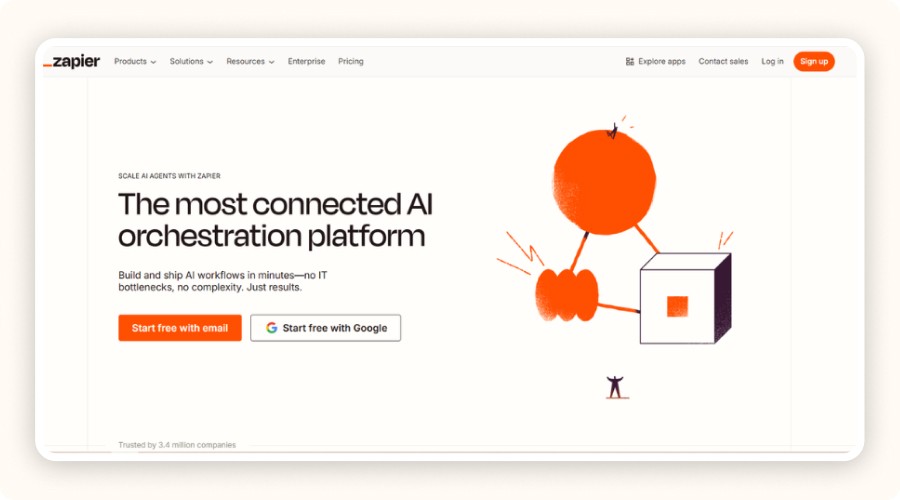
Zapier is an online automation platform that links two or more applications without requiring any technical skills. Its goal? To automate workflows between the apps you already use, Shopify, Google Sheets, Gmail, Slack, and more than 3,000 other integrations.
Each workflow, called a Zap, is made of two parts:
Trigger: the event that starts the automation (for example, a new order in Shopify),
Action: the automatic response (like saving order data in Google Sheets).
With this system, Zapier lets you automate dozens of daily operations without a single line of code. You can connect your apps, structure your business processes, and automate your routine operations. Whether it’s sending a Slack notification, logging a new customer email, or tracking inventory in a spreadsheet, Zapier turns repetitive tasks into smart automations.
If you want to automate your dropshipping business efficiently, Zapier is the automation tool you need. It allows you to:
Connect your favorite apps,
Save hours every week,
Eliminate manual errors.
You simply connect two applications (for example, Shopify and Google Sheets) and create a “Zap”, a workflow made of a trigger (e.g., new order) and an action (e.g., add a row in a spreadsheet). The interface is 100% visual and no-code, so anyone can use it. Each step is guided to make automation smooth and effortless.
What Is Zapier and Why Is It Important for Dropshipping?
To stop wasting time on repetitive dropshipping tasks, use Zapier. It automates your workflows without coding by connecting all your tools.
Zapier, the automation platform for everyone
Zapier is an online automation platform that links two or more applications without requiring any technical skills. Its goal? To automate workflows between the apps you already use, Shopify, Google Sheets, Gmail, Slack, and more than 3,000 other integrations.
Each workflow, called a Zap, is made of two parts:
Trigger: the event that starts the automation (for example, a new order in Shopify),
Action: the automatic response (like saving order data in Google Sheets).
With this system, Zapier lets you automate dozens of daily operations without a single line of code. You can connect your apps, structure your business processes, and automate your routine operations. Whether it’s sending a Slack notification, logging a new customer email, or tracking inventory in a spreadsheet, Zapier turns repetitive tasks into smart automations.
If you want to automate your dropshipping business efficiently, Zapier is the automation tool you need. It allows you to:
Connect your favorite apps,
Save hours every week,
Eliminate manual errors.
You simply connect two applications (for example, Shopify and Google Sheets) and create a “Zap”, a workflow made of a trigger (e.g., new order) and an action (e.g., add a row in a spreadsheet). The interface is 100% visual and no-code, so anyone can use it. Each step is guided to make automation smooth and effortless.
What Is Zapier and Why Is It Important for Dropshipping?
To stop wasting time on repetitive dropshipping tasks, use Zapier. It automates your workflows without coding by connecting all your tools.
Zapier, the automation platform for everyone
Zapier is an online automation platform that links two or more applications without requiring any technical skills. Its goal? To automate workflows between the apps you already use, Shopify, Google Sheets, Gmail, Slack, and more than 3,000 other integrations.
Each workflow, called a Zap, is made of two parts:
Trigger: the event that starts the automation (for example, a new order in Shopify),
Action: the automatic response (like saving order data in Google Sheets).
With this system, Zapier lets you automate dozens of daily operations without a single line of code. You can connect your apps, structure your business processes, and automate your routine operations. Whether it’s sending a Slack notification, logging a new customer email, or tracking inventory in a spreadsheet, Zapier turns repetitive tasks into smart automations.
If you want to automate your dropshipping business efficiently, Zapier is the automation tool you need. It allows you to:
Connect your favorite apps,
Save hours every week,
Eliminate manual errors.
You simply connect two applications (for example, Shopify and Google Sheets) and create a “Zap”, a workflow made of a trigger (e.g., new order) and an action (e.g., add a row in a spreadsheet). The interface is 100% visual and no-code, so anyone can use it. Each step is guided to make automation smooth and effortless.
What Is Zapier and Why Is It Important for Dropshipping?
To stop wasting time on repetitive dropshipping tasks, use Zapier. It automates your workflows without coding by connecting all your tools.
Zapier, the automation platform for everyone
Zapier is an online automation platform that links two or more applications without requiring any technical skills. Its goal? To automate workflows between the apps you already use, Shopify, Google Sheets, Gmail, Slack, and more than 3,000 other integrations.
Each workflow, called a Zap, is made of two parts:
Trigger: the event that starts the automation (for example, a new order in Shopify),
Action: the automatic response (like saving order data in Google Sheets).
With this system, Zapier lets you automate dozens of daily operations without a single line of code. You can connect your apps, structure your business processes, and automate your routine operations. Whether it’s sending a Slack notification, logging a new customer email, or tracking inventory in a spreadsheet, Zapier turns repetitive tasks into smart automations.
If you want to automate your dropshipping business efficiently, Zapier is the automation tool you need. It allows you to:
Connect your favorite apps,
Save hours every week,
Eliminate manual errors.
You simply connect two applications (for example, Shopify and Google Sheets) and create a “Zap”, a workflow made of a trigger (e.g., new order) and an action (e.g., add a row in a spreadsheet). The interface is 100% visual and no-code, so anyone can use it. Each step is guided to make automation smooth and effortless.
What Is Zapier and Why Is It Important for Dropshipping?
To stop wasting time on repetitive dropshipping tasks, use Zapier. It automates your workflows without coding by connecting all your tools.
Zapier, the automation platform for everyone
Zapier is an online automation platform that links two or more applications without requiring any technical skills. Its goal? To automate workflows between the apps you already use, Shopify, Google Sheets, Gmail, Slack, and more than 3,000 other integrations.
Each workflow, called a Zap, is made of two parts:
Trigger: the event that starts the automation (for example, a new order in Shopify),
Action: the automatic response (like saving order data in Google Sheets).
With this system, Zapier lets you automate dozens of daily operations without a single line of code. You can connect your apps, structure your business processes, and automate your routine operations. Whether it’s sending a Slack notification, logging a new customer email, or tracking inventory in a spreadsheet, Zapier turns repetitive tasks into smart automations.
If you want to automate your dropshipping business efficiently, Zapier is the automation tool you need. It allows you to:
Connect your favorite apps,
Save hours every week,
Eliminate manual errors.
You simply connect two applications (for example, Shopify and Google Sheets) and create a “Zap”, a workflow made of a trigger (e.g., new order) and an action (e.g., add a row in a spreadsheet). The interface is 100% visual and no-code, so anyone can use it. Each step is guided to make automation smooth and effortless.
What Is Zapier and Why Is It Important for Dropshipping?
To stop wasting time on repetitive dropshipping tasks, use Zapier. It automates your workflows without coding by connecting all your tools.
Zapier, the automation platform for everyone
Zapier is an online automation platform that links two or more applications without requiring any technical skills. Its goal? To automate workflows between the apps you already use, Shopify, Google Sheets, Gmail, Slack, and more than 3,000 other integrations.
Each workflow, called a Zap, is made of two parts:
Trigger: the event that starts the automation (for example, a new order in Shopify),
Action: the automatic response (like saving order data in Google Sheets).
With this system, Zapier lets you automate dozens of daily operations without a single line of code. You can connect your apps, structure your business processes, and automate your routine operations. Whether it’s sending a Slack notification, logging a new customer email, or tracking inventory in a spreadsheet, Zapier turns repetitive tasks into smart automations.

Take a Shortcut
Intensive coaching, $1,000/day guaranteed or your money back

Take a Shortcut
Intensive coaching, $1,000/day guaranteed or your money back
Take a Shortcut
Intensive coaching, $1,000/day guaranteed or your money back
Take a Shortcut
Intensive coaching, $1,000/day guaranteed or your money back
Take a Shortcut
Intensive coaching, $1,000/day guaranteed or your money back
Take a Shortcut
Intensive coaching, $1,000/day guaranteed or your money back
Why Zapier Is a Game-Changer for E-Commerce and Dropshipping

By using Zapier, you can:
Reduce manual, repetitive tasks,
Minimize human error,
Free up time to focus on scaling your business.
Automating key processes such as order management, email sending, and inventory syncing helps you standardize your workflow. It improves efficiency and responsiveness without hiring extra staff, a true advantage for e-commerce and dropshipping businesses.
How to Connect Zapier to Your Dropshipping Store
Before setting up your automations, connect your main tools. Zapier integrates seamlessly with e-commerce platforms like Shopify. Here’s how to link your store and create your first workflow step by step.
Connect Your Shopify Store to Zapier
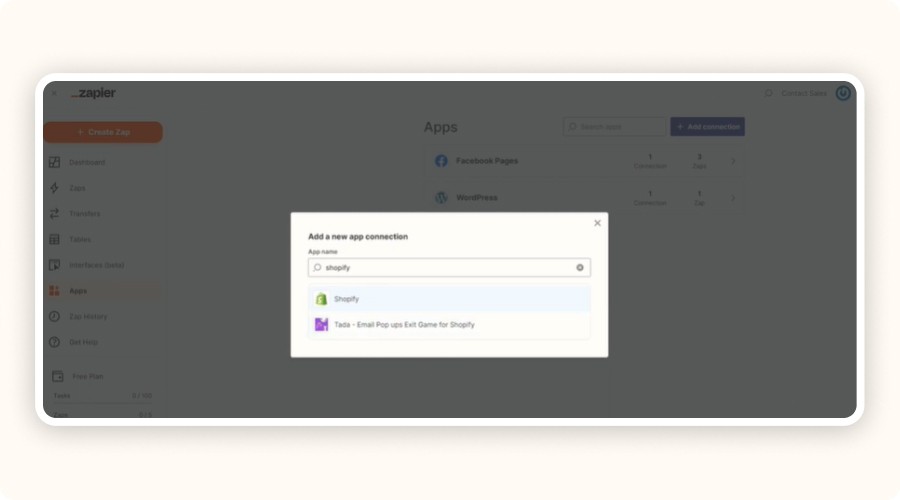
To automate your Shopify store with Zapier, install the Zapier app from the Shopify App Store. Search “Zapier,” click Add App, and approve the permissions. These permissions let Zapier access your Shopify data (orders, customers, products, etc.).
Once added, Zapier redirects you to its platform, where you can connect your Shopify and Zapier accounts. This link allows data to flow between Shopify and other dropshipping tools like Google Sheets, Slack, or your CRM, all without technical knowledge.
When the connection is ready, you can create your first workflow.
Create Your First Zap: From Trigger to Action
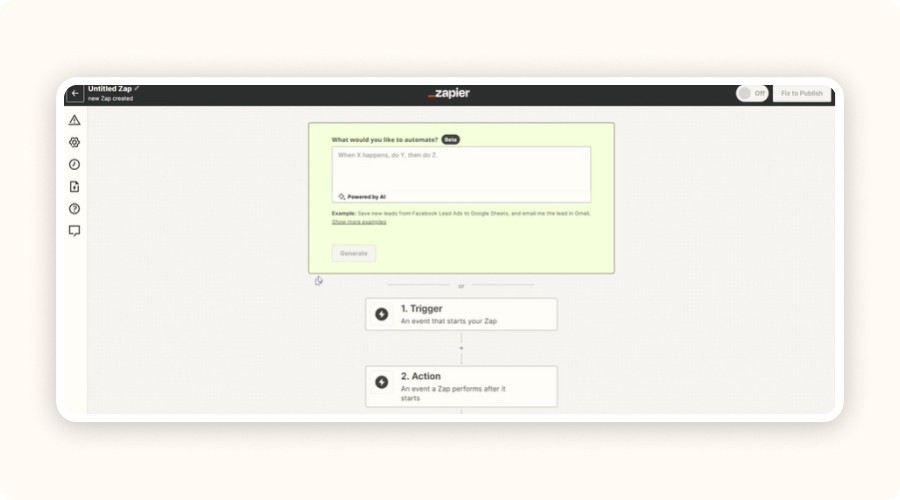
Every Zap starts with a trigger, the event that launches the automation. Let’s take an example: a new Shopify order.
Example 1 – New Order ➝ Send to Google Sheets
Create a Zap with:
Trigger: New Order
Action: Create Spreadsheet Row
Each new order automatically logs the customer name, order amount, and product details in your Google Sheet. No more manual input, your data stays clean, centralized, and ready for analysis.
Example 2 – New Customer ➝ Slack Notification
Create a Zap with:
Trigger: New Customer
Action: Send Channel Message
Every new signup instantly triggers a message to your team on Slack, ideal for stores that want to react quickly or send a personalized welcome.
How to set up a Zap:
Choose your trigger app (Shopify).
Select the event (new order, new customer).
Connect your action app (Google Sheets, Slack, Gmail).
Map the fields (name, email, product).
Test and activate your Zap.
Once active, your Shopify workflows run automatically, keeping your business efficient and error-free
Top 7 Zapier Workflows to Automate Your Dropshipping Business

Once your store is connected to Zapier, it’s time to act. Here are the most effective automations to save time, eliminate errors, and improve your performance every day.
Automatically Add New Orders to Google Sheets
Each time a new order comes in, Zapier sends it directly to Google Sheets. You can monitor order data in real time, no need to open Shopify or manually export reports. Your sales are centralized for analytics or accounting, which drastically reduces manual errors and admin work.
Notify Your Team on Slack for Every New Order
Whenever a customer completes a purchase, Zapier automatically sends a Slack notification to your team. Everyone stays informed instantly, improving responsiveness and order management. Real-time alerts = smoother operations and faster customer support.
Add New Customers to Your CRM or Email Platform
Each time a new customer makes a purchase, their info is added automatically to your CRM or email tool like Mailchimp, ActiveCampaign, or Klaviyo. No more copy-paste. You can launch targeted marketing campaigns automatically, which helps build a clean, growing customer list.
Recover Abandoned Carts Automatically via Email
With this Zap, Shopify can:
Detect abandoned carts,
Send recovery emails via your email tool,
Trigger retargeting ads through Google Ads or Facebook.
This automation helps you recover missed sales, increase your revenue, and boost conversions, all without lifting a finger.
Track Inventory Updates in Google Sheets
When your supplier updates stock levels, Zapier instantly syncs the data into a Google Sheets file. You get an up-to-date view of your inventory, avoid out-of-stock issues, and improve your supply chain management.
Auto-Publish New Products on Social Media
Each time you add a new product in Shopify, Zapier automatically posts it on your Facebook, Twitter, or other social channels, no scheduling tools needed. Perfect for creating instant visibility for new or digital products.
Capture and Qualify Leads from Landing Pages
When a customer fills out a form on Typeform or Unbounce, the lead is automatically sent to Google Sheets or your CRM. You can track every lead in real time and never miss a qualified contact again.
Why Zapier Is a Game-Changer for E-Commerce and Dropshipping
By using Zapier, you can:
Reduce manual, repetitive tasks,
Minimize human error,
Free up time to focus on scaling your business.
Automating key processes such as order management, email sending, and inventory syncing helps you standardize your workflow. It improves efficiency and responsiveness without hiring extra staff, a true advantage for e-commerce and dropshipping businesses.
How to Connect Zapier to Your Dropshipping Store
Before setting up your automations, connect your main tools. Zapier integrates seamlessly with e-commerce platforms like Shopify. Here’s how to link your store and create your first workflow step by step.
Connect Your Shopify Store to Zapier
To automate your Shopify store with Zapier, install the Zapier app from the Shopify App Store. Search “Zapier,” click Add App, and approve the permissions. These permissions let Zapier access your Shopify data (orders, customers, products, etc.).
Once added, Zapier redirects you to its platform, where you can connect your Shopify and Zapier accounts. This link allows data to flow between Shopify and other dropshipping tools like Google Sheets, Slack, or your CRM, all without technical knowledge.
When the connection is ready, you can create your first workflow.
Create Your First Zap: From Trigger to Action
Every Zap starts with a trigger, the event that launches the automation. Let’s take an example: a new Shopify order.
Example 1 – New Order ➝ Send to Google Sheets
Create a Zap with:
Trigger: New Order
Action: Create Spreadsheet Row
Each new order automatically logs the customer name, order amount, and product details in your Google Sheet. No more manual input, your data stays clean, centralized, and ready for analysis.
Example 2 – New Customer ➝ Slack Notification
Create a Zap with:
Trigger: New Customer
Action: Send Channel Message
Every new signup instantly triggers a message to your team on Slack, ideal for stores that want to react quickly or send a personalized welcome.
How to set up a Zap:
Choose your trigger app (Shopify).
Select the event (new order, new customer).
Connect your action app (Google Sheets, Slack, Gmail).
Map the fields (name, email, product).
Test and activate your Zap.
Once active, your Shopify workflows run automatically, keeping your business efficient and error-free
Top 7 Zapier Workflows to Automate Your Dropshipping Business
Once your store is connected to Zapier, it’s time to act. Here are the most effective automations to save time, eliminate errors, and improve your performance every day.
Automatically Add New Orders to Google Sheets
Each time a new order comes in, Zapier sends it directly to Google Sheets. You can monitor order data in real time, no need to open Shopify or manually export reports. Your sales are centralized for analytics or accounting, which drastically reduces manual errors and admin work.
Notify Your Team on Slack for Every New Order
Whenever a customer completes a purchase, Zapier automatically sends a Slack notification to your team. Everyone stays informed instantly, improving responsiveness and order management. Real-time alerts = smoother operations and faster customer support.
Add New Customers to Your CRM or Email Platform
Each time a new customer makes a purchase, their info is added automatically to your CRM or email tool like Mailchimp, ActiveCampaign, or Klaviyo. No more copy-paste. You can launch targeted marketing campaigns automatically, which helps build a clean, growing customer list.
Recover Abandoned Carts Automatically via Email
With this Zap, Shopify can:
Detect abandoned carts,
Send recovery emails via your email tool,
Trigger retargeting ads through Google Ads or Facebook.
This automation helps you recover missed sales, increase your revenue, and boost conversions, all without lifting a finger.
Track Inventory Updates in Google Sheets
When your supplier updates stock levels, Zapier instantly syncs the data into a Google Sheets file. You get an up-to-date view of your inventory, avoid out-of-stock issues, and improve your supply chain management.
Auto-Publish New Products on Social Media
Each time you add a new product in Shopify, Zapier automatically posts it on your Facebook, Twitter, or other social channels, no scheduling tools needed. Perfect for creating instant visibility for new or digital products.
Capture and Qualify Leads from Landing Pages
When a customer fills out a form on Typeform or Unbounce, the lead is automatically sent to Google Sheets or your CRM. You can track every lead in real time and never miss a qualified contact again.
Why Zapier Is a Game-Changer for E-Commerce and Dropshipping
By using Zapier, you can:
Reduce manual, repetitive tasks,
Minimize human error,
Free up time to focus on scaling your business.
Automating key processes such as order management, email sending, and inventory syncing helps you standardize your workflow. It improves efficiency and responsiveness without hiring extra staff, a true advantage for e-commerce and dropshipping businesses.
How to Connect Zapier to Your Dropshipping Store
Before setting up your automations, connect your main tools. Zapier integrates seamlessly with e-commerce platforms like Shopify. Here’s how to link your store and create your first workflow step by step.
Connect Your Shopify Store to Zapier
To automate your Shopify store with Zapier, install the Zapier app from the Shopify App Store. Search “Zapier,” click Add App, and approve the permissions. These permissions let Zapier access your Shopify data (orders, customers, products, etc.).
Once added, Zapier redirects you to its platform, where you can connect your Shopify and Zapier accounts. This link allows data to flow between Shopify and other dropshipping tools like Google Sheets, Slack, or your CRM, all without technical knowledge.
When the connection is ready, you can create your first workflow.
Create Your First Zap: From Trigger to Action
Every Zap starts with a trigger, the event that launches the automation. Let’s take an example: a new Shopify order.
Example 1 – New Order ➝ Send to Google Sheets
Create a Zap with:
Trigger: New Order
Action: Create Spreadsheet Row
Each new order automatically logs the customer name, order amount, and product details in your Google Sheet. No more manual input, your data stays clean, centralized, and ready for analysis.
Example 2 – New Customer ➝ Slack Notification
Create a Zap with:
Trigger: New Customer
Action: Send Channel Message
Every new signup instantly triggers a message to your team on Slack, ideal for stores that want to react quickly or send a personalized welcome.
How to set up a Zap:
Choose your trigger app (Shopify).
Select the event (new order, new customer).
Connect your action app (Google Sheets, Slack, Gmail).
Map the fields (name, email, product).
Test and activate your Zap.
Once active, your Shopify workflows run automatically, keeping your business efficient and error-free
Top 7 Zapier Workflows to Automate Your Dropshipping Business
Once your store is connected to Zapier, it’s time to act. Here are the most effective automations to save time, eliminate errors, and improve your performance every day.
Automatically Add New Orders to Google Sheets
Each time a new order comes in, Zapier sends it directly to Google Sheets. You can monitor order data in real time, no need to open Shopify or manually export reports. Your sales are centralized for analytics or accounting, which drastically reduces manual errors and admin work.
Notify Your Team on Slack for Every New Order
Whenever a customer completes a purchase, Zapier automatically sends a Slack notification to your team. Everyone stays informed instantly, improving responsiveness and order management. Real-time alerts = smoother operations and faster customer support.
Add New Customers to Your CRM or Email Platform
Each time a new customer makes a purchase, their info is added automatically to your CRM or email tool like Mailchimp, ActiveCampaign, or Klaviyo. No more copy-paste. You can launch targeted marketing campaigns automatically, which helps build a clean, growing customer list.
Recover Abandoned Carts Automatically via Email
With this Zap, Shopify can:
Detect abandoned carts,
Send recovery emails via your email tool,
Trigger retargeting ads through Google Ads or Facebook.
This automation helps you recover missed sales, increase your revenue, and boost conversions, all without lifting a finger.
Track Inventory Updates in Google Sheets
When your supplier updates stock levels, Zapier instantly syncs the data into a Google Sheets file. You get an up-to-date view of your inventory, avoid out-of-stock issues, and improve your supply chain management.
Auto-Publish New Products on Social Media
Each time you add a new product in Shopify, Zapier automatically posts it on your Facebook, Twitter, or other social channels, no scheduling tools needed. Perfect for creating instant visibility for new or digital products.
Capture and Qualify Leads from Landing Pages
When a customer fills out a form on Typeform or Unbounce, the lead is automatically sent to Google Sheets or your CRM. You can track every lead in real time and never miss a qualified contact again.
Why Zapier Is a Game-Changer for E-Commerce and Dropshipping
By using Zapier, you can:
Reduce manual, repetitive tasks,
Minimize human error,
Free up time to focus on scaling your business.
Automating key processes such as order management, email sending, and inventory syncing helps you standardize your workflow. It improves efficiency and responsiveness without hiring extra staff, a true advantage for e-commerce and dropshipping businesses.
How to Connect Zapier to Your Dropshipping Store
Before setting up your automations, connect your main tools. Zapier integrates seamlessly with e-commerce platforms like Shopify. Here’s how to link your store and create your first workflow step by step.
Connect Your Shopify Store to Zapier
To automate your Shopify store with Zapier, install the Zapier app from the Shopify App Store. Search “Zapier,” click Add App, and approve the permissions. These permissions let Zapier access your Shopify data (orders, customers, products, etc.).
Once added, Zapier redirects you to its platform, where you can connect your Shopify and Zapier accounts. This link allows data to flow between Shopify and other dropshipping tools like Google Sheets, Slack, or your CRM, all without technical knowledge.
When the connection is ready, you can create your first workflow.
Create Your First Zap: From Trigger to Action
Every Zap starts with a trigger, the event that launches the automation. Let’s take an example: a new Shopify order.
Example 1 – New Order ➝ Send to Google Sheets
Create a Zap with:
Trigger: New Order
Action: Create Spreadsheet Row
Each new order automatically logs the customer name, order amount, and product details in your Google Sheet. No more manual input, your data stays clean, centralized, and ready for analysis.
Example 2 – New Customer ➝ Slack Notification
Create a Zap with:
Trigger: New Customer
Action: Send Channel Message
Every new signup instantly triggers a message to your team on Slack, ideal for stores that want to react quickly or send a personalized welcome.
How to set up a Zap:
Choose your trigger app (Shopify).
Select the event (new order, new customer).
Connect your action app (Google Sheets, Slack, Gmail).
Map the fields (name, email, product).
Test and activate your Zap.
Once active, your Shopify workflows run automatically, keeping your business efficient and error-free
Top 7 Zapier Workflows to Automate Your Dropshipping Business
Once your store is connected to Zapier, it’s time to act. Here are the most effective automations to save time, eliminate errors, and improve your performance every day.
Automatically Add New Orders to Google Sheets
Each time a new order comes in, Zapier sends it directly to Google Sheets. You can monitor order data in real time, no need to open Shopify or manually export reports. Your sales are centralized for analytics or accounting, which drastically reduces manual errors and admin work.
Notify Your Team on Slack for Every New Order
Whenever a customer completes a purchase, Zapier automatically sends a Slack notification to your team. Everyone stays informed instantly, improving responsiveness and order management. Real-time alerts = smoother operations and faster customer support.
Add New Customers to Your CRM or Email Platform
Each time a new customer makes a purchase, their info is added automatically to your CRM or email tool like Mailchimp, ActiveCampaign, or Klaviyo. No more copy-paste. You can launch targeted marketing campaigns automatically, which helps build a clean, growing customer list.
Recover Abandoned Carts Automatically via Email
With this Zap, Shopify can:
Detect abandoned carts,
Send recovery emails via your email tool,
Trigger retargeting ads through Google Ads or Facebook.
This automation helps you recover missed sales, increase your revenue, and boost conversions, all without lifting a finger.
Track Inventory Updates in Google Sheets
When your supplier updates stock levels, Zapier instantly syncs the data into a Google Sheets file. You get an up-to-date view of your inventory, avoid out-of-stock issues, and improve your supply chain management.
Auto-Publish New Products on Social Media
Each time you add a new product in Shopify, Zapier automatically posts it on your Facebook, Twitter, or other social channels, no scheduling tools needed. Perfect for creating instant visibility for new or digital products.
Capture and Qualify Leads from Landing Pages
When a customer fills out a form on Typeform or Unbounce, the lead is automatically sent to Google Sheets or your CRM. You can track every lead in real time and never miss a qualified contact again.
Why Zapier Is a Game-Changer for E-Commerce and Dropshipping
By using Zapier, you can:
Reduce manual, repetitive tasks,
Minimize human error,
Free up time to focus on scaling your business.
Automating key processes such as order management, email sending, and inventory syncing helps you standardize your workflow. It improves efficiency and responsiveness without hiring extra staff, a true advantage for e-commerce and dropshipping businesses.
How to Connect Zapier to Your Dropshipping Store
Before setting up your automations, connect your main tools. Zapier integrates seamlessly with e-commerce platforms like Shopify. Here’s how to link your store and create your first workflow step by step.
Connect Your Shopify Store to Zapier
To automate your Shopify store with Zapier, install the Zapier app from the Shopify App Store. Search “Zapier,” click Add App, and approve the permissions. These permissions let Zapier access your Shopify data (orders, customers, products, etc.).
Once added, Zapier redirects you to its platform, where you can connect your Shopify and Zapier accounts. This link allows data to flow between Shopify and other dropshipping tools like Google Sheets, Slack, or your CRM, all without technical knowledge.
When the connection is ready, you can create your first workflow.
Create Your First Zap: From Trigger to Action
Every Zap starts with a trigger, the event that launches the automation. Let’s take an example: a new Shopify order.
Example 1 – New Order ➝ Send to Google Sheets
Create a Zap with:
Trigger: New Order
Action: Create Spreadsheet Row
Each new order automatically logs the customer name, order amount, and product details in your Google Sheet. No more manual input, your data stays clean, centralized, and ready for analysis.
Example 2 – New Customer ➝ Slack Notification
Create a Zap with:
Trigger: New Customer
Action: Send Channel Message
Every new signup instantly triggers a message to your team on Slack, ideal for stores that want to react quickly or send a personalized welcome.
How to set up a Zap:
Choose your trigger app (Shopify).
Select the event (new order, new customer).
Connect your action app (Google Sheets, Slack, Gmail).
Map the fields (name, email, product).
Test and activate your Zap.
Once active, your Shopify workflows run automatically, keeping your business efficient and error-free
Top 7 Zapier Workflows to Automate Your Dropshipping Business
Once your store is connected to Zapier, it’s time to act. Here are the most effective automations to save time, eliminate errors, and improve your performance every day.
Automatically Add New Orders to Google Sheets
Each time a new order comes in, Zapier sends it directly to Google Sheets. You can monitor order data in real time, no need to open Shopify or manually export reports. Your sales are centralized for analytics or accounting, which drastically reduces manual errors and admin work.
Notify Your Team on Slack for Every New Order
Whenever a customer completes a purchase, Zapier automatically sends a Slack notification to your team. Everyone stays informed instantly, improving responsiveness and order management. Real-time alerts = smoother operations and faster customer support.
Add New Customers to Your CRM or Email Platform
Each time a new customer makes a purchase, their info is added automatically to your CRM or email tool like Mailchimp, ActiveCampaign, or Klaviyo. No more copy-paste. You can launch targeted marketing campaigns automatically, which helps build a clean, growing customer list.
Recover Abandoned Carts Automatically via Email
With this Zap, Shopify can:
Detect abandoned carts,
Send recovery emails via your email tool,
Trigger retargeting ads through Google Ads or Facebook.
This automation helps you recover missed sales, increase your revenue, and boost conversions, all without lifting a finger.
Track Inventory Updates in Google Sheets
When your supplier updates stock levels, Zapier instantly syncs the data into a Google Sheets file. You get an up-to-date view of your inventory, avoid out-of-stock issues, and improve your supply chain management.
Auto-Publish New Products on Social Media
Each time you add a new product in Shopify, Zapier automatically posts it on your Facebook, Twitter, or other social channels, no scheduling tools needed. Perfect for creating instant visibility for new or digital products.
Capture and Qualify Leads from Landing Pages
When a customer fills out a form on Typeform or Unbounce, the lead is automatically sent to Google Sheets or your CRM. You can track every lead in real time and never miss a qualified contact again.
Why Zapier Is a Game-Changer for E-Commerce and Dropshipping
By using Zapier, you can:
Reduce manual, repetitive tasks,
Minimize human error,
Free up time to focus on scaling your business.
Automating key processes such as order management, email sending, and inventory syncing helps you standardize your workflow. It improves efficiency and responsiveness without hiring extra staff, a true advantage for e-commerce and dropshipping businesses.
How to Connect Zapier to Your Dropshipping Store
Before setting up your automations, connect your main tools. Zapier integrates seamlessly with e-commerce platforms like Shopify. Here’s how to link your store and create your first workflow step by step.
Connect Your Shopify Store to Zapier
To automate your Shopify store with Zapier, install the Zapier app from the Shopify App Store. Search “Zapier,” click Add App, and approve the permissions. These permissions let Zapier access your Shopify data (orders, customers, products, etc.).
Once added, Zapier redirects you to its platform, where you can connect your Shopify and Zapier accounts. This link allows data to flow between Shopify and other dropshipping tools like Google Sheets, Slack, or your CRM, all without technical knowledge.
When the connection is ready, you can create your first workflow.
Create Your First Zap: From Trigger to Action
Every Zap starts with a trigger, the event that launches the automation. Let’s take an example: a new Shopify order.
Example 1 – New Order ➝ Send to Google Sheets
Create a Zap with:
Trigger: New Order
Action: Create Spreadsheet Row
Each new order automatically logs the customer name, order amount, and product details in your Google Sheet. No more manual input, your data stays clean, centralized, and ready for analysis.
Example 2 – New Customer ➝ Slack Notification
Create a Zap with:
Trigger: New Customer
Action: Send Channel Message
Every new signup instantly triggers a message to your team on Slack, ideal for stores that want to react quickly or send a personalized welcome.
How to set up a Zap:
Choose your trigger app (Shopify).
Select the event (new order, new customer).
Connect your action app (Google Sheets, Slack, Gmail).
Map the fields (name, email, product).
Test and activate your Zap.
Once active, your Shopify workflows run automatically, keeping your business efficient and error-free
Top 7 Zapier Workflows to Automate Your Dropshipping Business
Once your store is connected to Zapier, it’s time to act. Here are the most effective automations to save time, eliminate errors, and improve your performance every day.
Automatically Add New Orders to Google Sheets
Each time a new order comes in, Zapier sends it directly to Google Sheets. You can monitor order data in real time, no need to open Shopify or manually export reports. Your sales are centralized for analytics or accounting, which drastically reduces manual errors and admin work.
Notify Your Team on Slack for Every New Order
Whenever a customer completes a purchase, Zapier automatically sends a Slack notification to your team. Everyone stays informed instantly, improving responsiveness and order management. Real-time alerts = smoother operations and faster customer support.
Add New Customers to Your CRM or Email Platform
Each time a new customer makes a purchase, their info is added automatically to your CRM or email tool like Mailchimp, ActiveCampaign, or Klaviyo. No more copy-paste. You can launch targeted marketing campaigns automatically, which helps build a clean, growing customer list.
Recover Abandoned Carts Automatically via Email
With this Zap, Shopify can:
Detect abandoned carts,
Send recovery emails via your email tool,
Trigger retargeting ads through Google Ads or Facebook.
This automation helps you recover missed sales, increase your revenue, and boost conversions, all without lifting a finger.
Track Inventory Updates in Google Sheets
When your supplier updates stock levels, Zapier instantly syncs the data into a Google Sheets file. You get an up-to-date view of your inventory, avoid out-of-stock issues, and improve your supply chain management.
Auto-Publish New Products on Social Media
Each time you add a new product in Shopify, Zapier automatically posts it on your Facebook, Twitter, or other social channels, no scheduling tools needed. Perfect for creating instant visibility for new or digital products.
Capture and Qualify Leads from Landing Pages
When a customer fills out a form on Typeform or Unbounce, the lead is automatically sent to Google Sheets or your CRM. You can track every lead in real time and never miss a qualified contact again.

How Multi-Step Zaps and Custom Workflows Work

A simple Zap can automate one task, but multi-step Zaps go further, chaining several actions or conditions together. This allows you to build advanced, flexible workflows that match your dropshipping business perfectly.
Combine Multiple Apps in One Zap
With multi-step Zaps, you can trigger multiple actions from a single event.
For example, when a customer places an order, Zapier can:
Add them to your CRM (Mailchimp, HubSpot, etc.),
Send a Slack notification to your team,
Create a task in Trello or Asana.
All in one automation. This keeps your operations organized, your team aligned, and your processes scalable, no constant app switching needed.
Use Conditional Logic and Filters for Smarter Automation
With Paths or Filters in Zapier, you can set up workflows that adapt based on customer data or behavior.
Examples:
If country = France, add the user to your French email list.
If product = premium offer, create a follow-up task for your team.
If cart value > $100, send an alert to your support team.
These intelligent automations let you personalize actions without manual segmentation or data sorting. Zapier takes care of it all, no coding skills required.
Even non-technical users can create complex, rule-based scenarios using Zapier’s simple visual interface.
Zapier Pricing: What’s Free and What’s Not
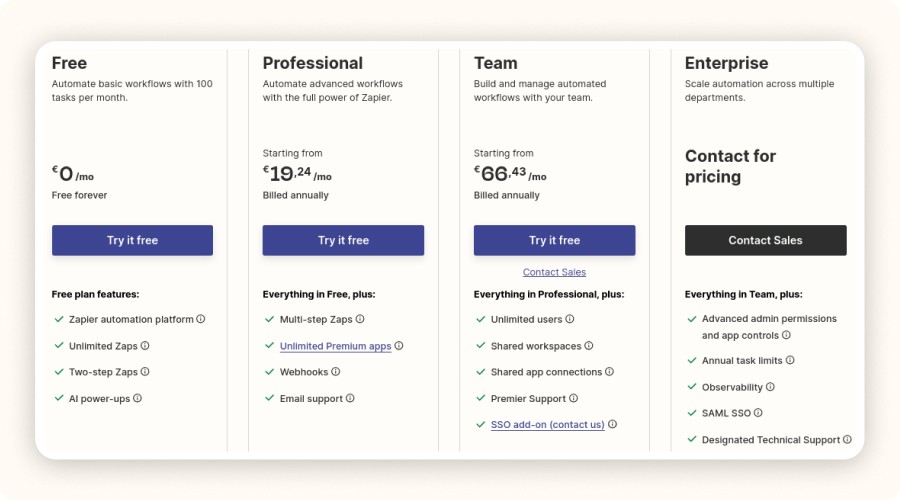
Before automating on a large scale, find out how much it costs. Zapier offers several plans with specific limits for each option.
Is Zapier’s Free Plan Enough for Dropshipping?
With Zapier’s free plan, you can create basic Zaps limited to two steps (1 trigger + 1 action). It’s perfect for testing simple automations like sending new Shopify orders to Google Sheets.
However, the free version quickly shows its limits. Once you start handling more than 100 tasks per month or want to connect Shopify (a premium app), you’ll need an upgrade. The free plan isn’t designed for an active dropshipping business.
Switch to a paid plan when:
You process over 100 orders or leads per month,
You need to connect Shopify, Google Ads, or other premium tools,
You want to run multi-step Zaps with multiple actions in one workflow.
For a growing business, free isn't enough. Sign up for a premium plan.
Plan | Monthly (billed monthly) | Monthly (billed annually) | Tasks/Month | Key Features |
|---|---|---|---|---|
Starter | $29.99 | $19.99 | 750 | Multi-step Zaps, limited premium apps |
Professional | $73.50 | $49.00 | 2,000 | Advanced Zaps, filters, conditional logic |
Team | $103.50 | $69.00 | 2,000+ (scalable) | Collaboration, user management, priority support |
Company | Custom | Custom | Unlimited | Security, SSO, advanced admin controls |
Best Zapier Plans for Dropshippers
Plan | Tasks/Month | Premium Apps (e.g. Shopify) | Multi-Step Zaps | Support |
|---|---|---|---|---|
Free | 100 | ❌ | ❌ | Limited |
Starter (~$29/mo) | 750 | ✅ | ✅ | Standard |
Professional | 2,000+ | ✅ | ✅ | Priority |
Team & Company | 10,000+ | ✅ | ✅ | Premium |
Even the Starter plan gives you access to all the essential integrations (Shopify, Google Sheets, Slack), while Professional and Team are best for scaling stores running hundreds of automations.
Common Mistakes to Avoid When Automating with Zapier

Automation can save you hours, but only if done right. Avoid these common errors that limit efficiency or overload your account.
Mistake #1: Not Testing Your Zaps
Launching a Zap without testing is a fast way to break your workflows. Always test with real data before activating. Check the trigger, action, and result carefully. Skipping this step may lead to incorrect data or chain errors.
Always test a Zap with a real Shopify example before putting it live.
Mistake #2: Automating the Wrong Tasks
Not everything should be automated. Customer support, dispute management, or personalized marketing still require a human touch.
Focus on repetitive, structured, low-value tasks, order entries, status updates, inventory syncs. Automate what saves time, not what defines your brand voice.
Mistake #3: Hitting Task Limits Too Quickly
A poorly optimized Zap can eat through your monthly quota fast. To prevent overages or plan upgrades:
Remove unnecessary steps,
Combine multiple actions into one Zap,
Use filters to trigger Zaps only when needed.
This helps keep your automation lean, efficient, and affordable.
How Multi-Step Zaps and Custom Workflows Work
A simple Zap can automate one task, but multi-step Zaps go further, chaining several actions or conditions together. This allows you to build advanced, flexible workflows that match your dropshipping business perfectly.
Combine Multiple Apps in One Zap
With multi-step Zaps, you can trigger multiple actions from a single event.
For example, when a customer places an order, Zapier can:
Add them to your CRM (Mailchimp, HubSpot, etc.),
Send a Slack notification to your team,
Create a task in Trello or Asana.
All in one automation. This keeps your operations organized, your team aligned, and your processes scalable, no constant app switching needed.
Use Conditional Logic and Filters for Smarter Automation
With Paths or Filters in Zapier, you can set up workflows that adapt based on customer data or behavior.
Examples:
If country = France, add the user to your French email list.
If product = premium offer, create a follow-up task for your team.
If cart value > $100, send an alert to your support team.
These intelligent automations let you personalize actions without manual segmentation or data sorting. Zapier takes care of it all, no coding skills required.
Even non-technical users can create complex, rule-based scenarios using Zapier’s simple visual interface.
Zapier Pricing: What’s Free and What’s Not
Before automating on a large scale, find out how much it costs. Zapier offers several plans with specific limits for each option.
Is Zapier’s Free Plan Enough for Dropshipping?
With Zapier’s free plan, you can create basic Zaps limited to two steps (1 trigger + 1 action). It’s perfect for testing simple automations like sending new Shopify orders to Google Sheets.
However, the free version quickly shows its limits. Once you start handling more than 100 tasks per month or want to connect Shopify (a premium app), you’ll need an upgrade. The free plan isn’t designed for an active dropshipping business.
Switch to a paid plan when:
You process over 100 orders or leads per month,
You need to connect Shopify, Google Ads, or other premium tools,
You want to run multi-step Zaps with multiple actions in one workflow.
For a growing business, free isn't enough. Sign up for a premium plan.
Plan | Monthly (billed monthly) | Monthly (billed annually) | Tasks/Month | Key Features |
|---|---|---|---|---|
Starter | $29.99 | $19.99 | 750 | Multi-step Zaps, limited premium apps |
Professional | $73.50 | $49.00 | 2,000 | Advanced Zaps, filters, conditional logic |
Team | $103.50 | $69.00 | 2,000+ (scalable) | Collaboration, user management, priority support |
Company | Custom | Custom | Unlimited | Security, SSO, advanced admin controls |
Best Zapier Plans for Dropshippers
Plan | Tasks/Month | Premium Apps (e.g. Shopify) | Multi-Step Zaps | Support |
|---|---|---|---|---|
Free | 100 | ❌ | ❌ | Limited |
Starter (~$29/mo) | 750 | ✅ | ✅ | Standard |
Professional | 2,000+ | ✅ | ✅ | Priority |
Team & Company | 10,000+ | ✅ | ✅ | Premium |
Even the Starter plan gives you access to all the essential integrations (Shopify, Google Sheets, Slack), while Professional and Team are best for scaling stores running hundreds of automations.
Common Mistakes to Avoid When Automating with Zapier
Automation can save you hours, but only if done right. Avoid these common errors that limit efficiency or overload your account.
Mistake #1: Not Testing Your Zaps
Launching a Zap without testing is a fast way to break your workflows. Always test with real data before activating. Check the trigger, action, and result carefully. Skipping this step may lead to incorrect data or chain errors.
Always test a Zap with a real Shopify example before putting it live.
Mistake #2: Automating the Wrong Tasks
Not everything should be automated. Customer support, dispute management, or personalized marketing still require a human touch.
Focus on repetitive, structured, low-value tasks, order entries, status updates, inventory syncs. Automate what saves time, not what defines your brand voice.
Mistake #3: Hitting Task Limits Too Quickly
A poorly optimized Zap can eat through your monthly quota fast. To prevent overages or plan upgrades:
Remove unnecessary steps,
Combine multiple actions into one Zap,
Use filters to trigger Zaps only when needed.
This helps keep your automation lean, efficient, and affordable.
How Multi-Step Zaps and Custom Workflows Work
A simple Zap can automate one task, but multi-step Zaps go further, chaining several actions or conditions together. This allows you to build advanced, flexible workflows that match your dropshipping business perfectly.
Combine Multiple Apps in One Zap
With multi-step Zaps, you can trigger multiple actions from a single event.
For example, when a customer places an order, Zapier can:
Add them to your CRM (Mailchimp, HubSpot, etc.),
Send a Slack notification to your team,
Create a task in Trello or Asana.
All in one automation. This keeps your operations organized, your team aligned, and your processes scalable, no constant app switching needed.
Use Conditional Logic and Filters for Smarter Automation
With Paths or Filters in Zapier, you can set up workflows that adapt based on customer data or behavior.
Examples:
If country = France, add the user to your French email list.
If product = premium offer, create a follow-up task for your team.
If cart value > $100, send an alert to your support team.
These intelligent automations let you personalize actions without manual segmentation or data sorting. Zapier takes care of it all, no coding skills required.
Even non-technical users can create complex, rule-based scenarios using Zapier’s simple visual interface.
Zapier Pricing: What’s Free and What’s Not
Before automating on a large scale, find out how much it costs. Zapier offers several plans with specific limits for each option.
Is Zapier’s Free Plan Enough for Dropshipping?
With Zapier’s free plan, you can create basic Zaps limited to two steps (1 trigger + 1 action). It’s perfect for testing simple automations like sending new Shopify orders to Google Sheets.
However, the free version quickly shows its limits. Once you start handling more than 100 tasks per month or want to connect Shopify (a premium app), you’ll need an upgrade. The free plan isn’t designed for an active dropshipping business.
Switch to a paid plan when:
You process over 100 orders or leads per month,
You need to connect Shopify, Google Ads, or other premium tools,
You want to run multi-step Zaps with multiple actions in one workflow.
For a growing business, free isn't enough. Sign up for a premium plan.
Plan | Monthly (billed monthly) | Monthly (billed annually) | Tasks/Month | Key Features |
|---|---|---|---|---|
Starter | $29.99 | $19.99 | 750 | Multi-step Zaps, limited premium apps |
Professional | $73.50 | $49.00 | 2,000 | Advanced Zaps, filters, conditional logic |
Team | $103.50 | $69.00 | 2,000+ (scalable) | Collaboration, user management, priority support |
Company | Custom | Custom | Unlimited | Security, SSO, advanced admin controls |
Best Zapier Plans for Dropshippers
Plan | Tasks/Month | Premium Apps (e.g. Shopify) | Multi-Step Zaps | Support |
|---|---|---|---|---|
Free | 100 | ❌ | ❌ | Limited |
Starter (~$29/mo) | 750 | ✅ | ✅ | Standard |
Professional | 2,000+ | ✅ | ✅ | Priority |
Team & Company | 10,000+ | ✅ | ✅ | Premium |
Even the Starter plan gives you access to all the essential integrations (Shopify, Google Sheets, Slack), while Professional and Team are best for scaling stores running hundreds of automations.
Common Mistakes to Avoid When Automating with Zapier
Automation can save you hours, but only if done right. Avoid these common errors that limit efficiency or overload your account.
Mistake #1: Not Testing Your Zaps
Launching a Zap without testing is a fast way to break your workflows. Always test with real data before activating. Check the trigger, action, and result carefully. Skipping this step may lead to incorrect data or chain errors.
Always test a Zap with a real Shopify example before putting it live.
Mistake #2: Automating the Wrong Tasks
Not everything should be automated. Customer support, dispute management, or personalized marketing still require a human touch.
Focus on repetitive, structured, low-value tasks, order entries, status updates, inventory syncs. Automate what saves time, not what defines your brand voice.
Mistake #3: Hitting Task Limits Too Quickly
A poorly optimized Zap can eat through your monthly quota fast. To prevent overages or plan upgrades:
Remove unnecessary steps,
Combine multiple actions into one Zap,
Use filters to trigger Zaps only when needed.
This helps keep your automation lean, efficient, and affordable.
How Multi-Step Zaps and Custom Workflows Work
A simple Zap can automate one task, but multi-step Zaps go further, chaining several actions or conditions together. This allows you to build advanced, flexible workflows that match your dropshipping business perfectly.
Combine Multiple Apps in One Zap
With multi-step Zaps, you can trigger multiple actions from a single event.
For example, when a customer places an order, Zapier can:
Add them to your CRM (Mailchimp, HubSpot, etc.),
Send a Slack notification to your team,
Create a task in Trello or Asana.
All in one automation. This keeps your operations organized, your team aligned, and your processes scalable, no constant app switching needed.
Use Conditional Logic and Filters for Smarter Automation
With Paths or Filters in Zapier, you can set up workflows that adapt based on customer data or behavior.
Examples:
If country = France, add the user to your French email list.
If product = premium offer, create a follow-up task for your team.
If cart value > $100, send an alert to your support team.
These intelligent automations let you personalize actions without manual segmentation or data sorting. Zapier takes care of it all, no coding skills required.
Even non-technical users can create complex, rule-based scenarios using Zapier’s simple visual interface.
Zapier Pricing: What’s Free and What’s Not
Before automating on a large scale, find out how much it costs. Zapier offers several plans with specific limits for each option.
Is Zapier’s Free Plan Enough for Dropshipping?
With Zapier’s free plan, you can create basic Zaps limited to two steps (1 trigger + 1 action). It’s perfect for testing simple automations like sending new Shopify orders to Google Sheets.
However, the free version quickly shows its limits. Once you start handling more than 100 tasks per month or want to connect Shopify (a premium app), you’ll need an upgrade. The free plan isn’t designed for an active dropshipping business.
Switch to a paid plan when:
You process over 100 orders or leads per month,
You need to connect Shopify, Google Ads, or other premium tools,
You want to run multi-step Zaps with multiple actions in one workflow.
For a growing business, free isn't enough. Sign up for a premium plan.
Plan | Monthly (billed monthly) | Monthly (billed annually) | Tasks/Month | Key Features |
|---|---|---|---|---|
Starter | $29.99 | $19.99 | 750 | Multi-step Zaps, limited premium apps |
Professional | $73.50 | $49.00 | 2,000 | Advanced Zaps, filters, conditional logic |
Team | $103.50 | $69.00 | 2,000+ (scalable) | Collaboration, user management, priority support |
Company | Custom | Custom | Unlimited | Security, SSO, advanced admin controls |
Best Zapier Plans for Dropshippers
Plan | Tasks/Month | Premium Apps (e.g. Shopify) | Multi-Step Zaps | Support |
|---|---|---|---|---|
Free | 100 | ❌ | ❌ | Limited |
Starter (~$29/mo) | 750 | ✅ | ✅ | Standard |
Professional | 2,000+ | ✅ | ✅ | Priority |
Team & Company | 10,000+ | ✅ | ✅ | Premium |
Even the Starter plan gives you access to all the essential integrations (Shopify, Google Sheets, Slack), while Professional and Team are best for scaling stores running hundreds of automations.
Common Mistakes to Avoid When Automating with Zapier
Automation can save you hours, but only if done right. Avoid these common errors that limit efficiency or overload your account.
Mistake #1: Not Testing Your Zaps
Launching a Zap without testing is a fast way to break your workflows. Always test with real data before activating. Check the trigger, action, and result carefully. Skipping this step may lead to incorrect data or chain errors.
Always test a Zap with a real Shopify example before putting it live.
Mistake #2: Automating the Wrong Tasks
Not everything should be automated. Customer support, dispute management, or personalized marketing still require a human touch.
Focus on repetitive, structured, low-value tasks, order entries, status updates, inventory syncs. Automate what saves time, not what defines your brand voice.
Mistake #3: Hitting Task Limits Too Quickly
A poorly optimized Zap can eat through your monthly quota fast. To prevent overages or plan upgrades:
Remove unnecessary steps,
Combine multiple actions into one Zap,
Use filters to trigger Zaps only when needed.
This helps keep your automation lean, efficient, and affordable.
How Multi-Step Zaps and Custom Workflows Work
A simple Zap can automate one task, but multi-step Zaps go further, chaining several actions or conditions together. This allows you to build advanced, flexible workflows that match your dropshipping business perfectly.
Combine Multiple Apps in One Zap
With multi-step Zaps, you can trigger multiple actions from a single event.
For example, when a customer places an order, Zapier can:
Add them to your CRM (Mailchimp, HubSpot, etc.),
Send a Slack notification to your team,
Create a task in Trello or Asana.
All in one automation. This keeps your operations organized, your team aligned, and your processes scalable, no constant app switching needed.
Use Conditional Logic and Filters for Smarter Automation
With Paths or Filters in Zapier, you can set up workflows that adapt based on customer data or behavior.
Examples:
If country = France, add the user to your French email list.
If product = premium offer, create a follow-up task for your team.
If cart value > $100, send an alert to your support team.
These intelligent automations let you personalize actions without manual segmentation or data sorting. Zapier takes care of it all, no coding skills required.
Even non-technical users can create complex, rule-based scenarios using Zapier’s simple visual interface.
Zapier Pricing: What’s Free and What’s Not
Before automating on a large scale, find out how much it costs. Zapier offers several plans with specific limits for each option.
Is Zapier’s Free Plan Enough for Dropshipping?
With Zapier’s free plan, you can create basic Zaps limited to two steps (1 trigger + 1 action). It’s perfect for testing simple automations like sending new Shopify orders to Google Sheets.
However, the free version quickly shows its limits. Once you start handling more than 100 tasks per month or want to connect Shopify (a premium app), you’ll need an upgrade. The free plan isn’t designed for an active dropshipping business.
Switch to a paid plan when:
You process over 100 orders or leads per month,
You need to connect Shopify, Google Ads, or other premium tools,
You want to run multi-step Zaps with multiple actions in one workflow.
For a growing business, free isn't enough. Sign up for a premium plan.
Plan | Monthly (billed monthly) | Monthly (billed annually) | Tasks/Month | Key Features |
|---|---|---|---|---|
Starter | $29.99 | $19.99 | 750 | Multi-step Zaps, limited premium apps |
Professional | $73.50 | $49.00 | 2,000 | Advanced Zaps, filters, conditional logic |
Team | $103.50 | $69.00 | 2,000+ (scalable) | Collaboration, user management, priority support |
Company | Custom | Custom | Unlimited | Security, SSO, advanced admin controls |
Best Zapier Plans for Dropshippers
Plan | Tasks/Month | Premium Apps (e.g. Shopify) | Multi-Step Zaps | Support |
|---|---|---|---|---|
Free | 100 | ❌ | ❌ | Limited |
Starter (~$29/mo) | 750 | ✅ | ✅ | Standard |
Professional | 2,000+ | ✅ | ✅ | Priority |
Team & Company | 10,000+ | ✅ | ✅ | Premium |
Even the Starter plan gives you access to all the essential integrations (Shopify, Google Sheets, Slack), while Professional and Team are best for scaling stores running hundreds of automations.
Common Mistakes to Avoid When Automating with Zapier
Automation can save you hours, but only if done right. Avoid these common errors that limit efficiency or overload your account.
Mistake #1: Not Testing Your Zaps
Launching a Zap without testing is a fast way to break your workflows. Always test with real data before activating. Check the trigger, action, and result carefully. Skipping this step may lead to incorrect data or chain errors.
Always test a Zap with a real Shopify example before putting it live.
Mistake #2: Automating the Wrong Tasks
Not everything should be automated. Customer support, dispute management, or personalized marketing still require a human touch.
Focus on repetitive, structured, low-value tasks, order entries, status updates, inventory syncs. Automate what saves time, not what defines your brand voice.
Mistake #3: Hitting Task Limits Too Quickly
A poorly optimized Zap can eat through your monthly quota fast. To prevent overages or plan upgrades:
Remove unnecessary steps,
Combine multiple actions into one Zap,
Use filters to trigger Zaps only when needed.
This helps keep your automation lean, efficient, and affordable.
How Multi-Step Zaps and Custom Workflows Work
A simple Zap can automate one task, but multi-step Zaps go further, chaining several actions or conditions together. This allows you to build advanced, flexible workflows that match your dropshipping business perfectly.
Combine Multiple Apps in One Zap
With multi-step Zaps, you can trigger multiple actions from a single event.
For example, when a customer places an order, Zapier can:
Add them to your CRM (Mailchimp, HubSpot, etc.),
Send a Slack notification to your team,
Create a task in Trello or Asana.
All in one automation. This keeps your operations organized, your team aligned, and your processes scalable, no constant app switching needed.
Use Conditional Logic and Filters for Smarter Automation
With Paths or Filters in Zapier, you can set up workflows that adapt based on customer data or behavior.
Examples:
If country = France, add the user to your French email list.
If product = premium offer, create a follow-up task for your team.
If cart value > $100, send an alert to your support team.
These intelligent automations let you personalize actions without manual segmentation or data sorting. Zapier takes care of it all, no coding skills required.
Even non-technical users can create complex, rule-based scenarios using Zapier’s simple visual interface.
Zapier Pricing: What’s Free and What’s Not
Before automating on a large scale, find out how much it costs. Zapier offers several plans with specific limits for each option.
Is Zapier’s Free Plan Enough for Dropshipping?
With Zapier’s free plan, you can create basic Zaps limited to two steps (1 trigger + 1 action). It’s perfect for testing simple automations like sending new Shopify orders to Google Sheets.
However, the free version quickly shows its limits. Once you start handling more than 100 tasks per month or want to connect Shopify (a premium app), you’ll need an upgrade. The free plan isn’t designed for an active dropshipping business.
Switch to a paid plan when:
You process over 100 orders or leads per month,
You need to connect Shopify, Google Ads, or other premium tools,
You want to run multi-step Zaps with multiple actions in one workflow.
For a growing business, free isn't enough. Sign up for a premium plan.
Plan | Monthly (billed monthly) | Monthly (billed annually) | Tasks/Month | Key Features |
|---|---|---|---|---|
Starter | $29.99 | $19.99 | 750 | Multi-step Zaps, limited premium apps |
Professional | $73.50 | $49.00 | 2,000 | Advanced Zaps, filters, conditional logic |
Team | $103.50 | $69.00 | 2,000+ (scalable) | Collaboration, user management, priority support |
Company | Custom | Custom | Unlimited | Security, SSO, advanced admin controls |
Best Zapier Plans for Dropshippers
Plan | Tasks/Month | Premium Apps (e.g. Shopify) | Multi-Step Zaps | Support |
|---|---|---|---|---|
Free | 100 | ❌ | ❌ | Limited |
Starter (~$29/mo) | 750 | ✅ | ✅ | Standard |
Professional | 2,000+ | ✅ | ✅ | Priority |
Team & Company | 10,000+ | ✅ | ✅ | Premium |
Even the Starter plan gives you access to all the essential integrations (Shopify, Google Sheets, Slack), while Professional and Team are best for scaling stores running hundreds of automations.
Common Mistakes to Avoid When Automating with Zapier
Automation can save you hours, but only if done right. Avoid these common errors that limit efficiency or overload your account.
Mistake #1: Not Testing Your Zaps
Launching a Zap without testing is a fast way to break your workflows. Always test with real data before activating. Check the trigger, action, and result carefully. Skipping this step may lead to incorrect data or chain errors.
Always test a Zap with a real Shopify example before putting it live.
Mistake #2: Automating the Wrong Tasks
Not everything should be automated. Customer support, dispute management, or personalized marketing still require a human touch.
Focus on repetitive, structured, low-value tasks, order entries, status updates, inventory syncs. Automate what saves time, not what defines your brand voice.
Mistake #3: Hitting Task Limits Too Quickly
A poorly optimized Zap can eat through your monthly quota fast. To prevent overages or plan upgrades:
Remove unnecessary steps,
Combine multiple actions into one Zap,
Use filters to trigger Zaps only when needed.
This helps keep your automation lean, efficient, and affordable.

Conclusion: Turn Repetitive Tasks into Growth Drivers with Zapier
Automating your dropshipping business with Zapier saves time, reduces errors, and helps you grow faster. Fewer manual tasks mean more focus on what truly matters, sales and customer satisfaction.
Every minute saved is an opportunity to expand your catalog, improve your service, or launch new campaigns.
The ROI is immediate from your first automated workflow.
Start your free Zapier trial today and build your first Zap to automate your Shopify store.
FAQ:
How do I use Zapier for my dropshipping business?
Install Zapier from the Shopify App Store, connect your apps, and create “Zaps” that automate workflows such as order tracking, CRM updates, or email notifications.
Is Zapier free for dropshipping?
Yes, Zapier offers a free plan for simple automations, but it’s limited to 100 tasks/month and no Shopify integration. For active dropshippers, the Starter plan ($19.99/mo) is best.
What are the best Zapier workflows for dropshipping?
Top Zaps include syncing new orders to Google Sheets, sending Slack alerts, adding new customers to your CRM, and recovering abandoned carts automatically.
Can Zapier improve eCommerce performance?
Absolutely. Zapier streamlines operations, improves order accuracy, boosts response time, and lets you scale your dropshipping store with minimal effort.
Conclusion: Turn Repetitive Tasks into Growth Drivers with Zapier
Automating your dropshipping business with Zapier saves time, reduces errors, and helps you grow faster. Fewer manual tasks mean more focus on what truly matters, sales and customer satisfaction.
Every minute saved is an opportunity to expand your catalog, improve your service, or launch new campaigns.
The ROI is immediate from your first automated workflow.
Start your free Zapier trial today and build your first Zap to automate your Shopify store.
FAQ:
How do I use Zapier for my dropshipping business?
Install Zapier from the Shopify App Store, connect your apps, and create “Zaps” that automate workflows such as order tracking, CRM updates, or email notifications.
Is Zapier free for dropshipping?
Yes, Zapier offers a free plan for simple automations, but it’s limited to 100 tasks/month and no Shopify integration. For active dropshippers, the Starter plan ($19.99/mo) is best.
What are the best Zapier workflows for dropshipping?
Top Zaps include syncing new orders to Google Sheets, sending Slack alerts, adding new customers to your CRM, and recovering abandoned carts automatically.
Can Zapier improve eCommerce performance?
Absolutely. Zapier streamlines operations, improves order accuracy, boosts response time, and lets you scale your dropshipping store with minimal effort.
Conclusion: Turn Repetitive Tasks into Growth Drivers with Zapier
Automating your dropshipping business with Zapier saves time, reduces errors, and helps you grow faster. Fewer manual tasks mean more focus on what truly matters, sales and customer satisfaction.
Every minute saved is an opportunity to expand your catalog, improve your service, or launch new campaigns.
The ROI is immediate from your first automated workflow.
Start your free Zapier trial today and build your first Zap to automate your Shopify store.
FAQ:
How do I use Zapier for my dropshipping business?
Install Zapier from the Shopify App Store, connect your apps, and create “Zaps” that automate workflows such as order tracking, CRM updates, or email notifications.
Is Zapier free for dropshipping?
Yes, Zapier offers a free plan for simple automations, but it’s limited to 100 tasks/month and no Shopify integration. For active dropshippers, the Starter plan ($19.99/mo) is best.
What are the best Zapier workflows for dropshipping?
Top Zaps include syncing new orders to Google Sheets, sending Slack alerts, adding new customers to your CRM, and recovering abandoned carts automatically.
Can Zapier improve eCommerce performance?
Absolutely. Zapier streamlines operations, improves order accuracy, boosts response time, and lets you scale your dropshipping store with minimal effort.
Conclusion: Turn Repetitive Tasks into Growth Drivers with Zapier
Automating your dropshipping business with Zapier saves time, reduces errors, and helps you grow faster. Fewer manual tasks mean more focus on what truly matters, sales and customer satisfaction.
Every minute saved is an opportunity to expand your catalog, improve your service, or launch new campaigns.
The ROI is immediate from your first automated workflow.
Start your free Zapier trial today and build your first Zap to automate your Shopify store.
FAQ:
How do I use Zapier for my dropshipping business?
Install Zapier from the Shopify App Store, connect your apps, and create “Zaps” that automate workflows such as order tracking, CRM updates, or email notifications.
Is Zapier free for dropshipping?
Yes, Zapier offers a free plan for simple automations, but it’s limited to 100 tasks/month and no Shopify integration. For active dropshippers, the Starter plan ($19.99/mo) is best.
What are the best Zapier workflows for dropshipping?
Top Zaps include syncing new orders to Google Sheets, sending Slack alerts, adding new customers to your CRM, and recovering abandoned carts automatically.
Can Zapier improve eCommerce performance?
Absolutely. Zapier streamlines operations, improves order accuracy, boosts response time, and lets you scale your dropshipping store with minimal effort.
Conclusion: Turn Repetitive Tasks into Growth Drivers with Zapier
Automating your dropshipping business with Zapier saves time, reduces errors, and helps you grow faster. Fewer manual tasks mean more focus on what truly matters, sales and customer satisfaction.
Every minute saved is an opportunity to expand your catalog, improve your service, or launch new campaigns.
The ROI is immediate from your first automated workflow.
Start your free Zapier trial today and build your first Zap to automate your Shopify store.
FAQ:
How do I use Zapier for my dropshipping business?
Install Zapier from the Shopify App Store, connect your apps, and create “Zaps” that automate workflows such as order tracking, CRM updates, or email notifications.
Is Zapier free for dropshipping?
Yes, Zapier offers a free plan for simple automations, but it’s limited to 100 tasks/month and no Shopify integration. For active dropshippers, the Starter plan ($19.99/mo) is best.
What are the best Zapier workflows for dropshipping?
Top Zaps include syncing new orders to Google Sheets, sending Slack alerts, adding new customers to your CRM, and recovering abandoned carts automatically.
Can Zapier improve eCommerce performance?
Absolutely. Zapier streamlines operations, improves order accuracy, boosts response time, and lets you scale your dropshipping store with minimal effort.
Conclusion: Turn Repetitive Tasks into Growth Drivers with Zapier
Automating your dropshipping business with Zapier saves time, reduces errors, and helps you grow faster. Fewer manual tasks mean more focus on what truly matters, sales and customer satisfaction.
Every minute saved is an opportunity to expand your catalog, improve your service, or launch new campaigns.
The ROI is immediate from your first automated workflow.
Start your free Zapier trial today and build your first Zap to automate your Shopify store.
FAQ:
How do I use Zapier for my dropshipping business?
Install Zapier from the Shopify App Store, connect your apps, and create “Zaps” that automate workflows such as order tracking, CRM updates, or email notifications.
Is Zapier free for dropshipping?
Yes, Zapier offers a free plan for simple automations, but it’s limited to 100 tasks/month and no Shopify integration. For active dropshippers, the Starter plan ($19.99/mo) is best.
What are the best Zapier workflows for dropshipping?
Top Zaps include syncing new orders to Google Sheets, sending Slack alerts, adding new customers to your CRM, and recovering abandoned carts automatically.
Can Zapier improve eCommerce performance?
Absolutely. Zapier streamlines operations, improves order accuracy, boosts response time, and lets you scale your dropshipping store with minimal effort.
Similar articles
Notion Ecommerce: How to Run and Scale Your Dropshipping Business in One Workspace
November 30, 2025
Dropshipping Automation Software
Notion Ecommerce: How to Run and Scale Your Dropshipping Business in One Workspace
November 30, 2025
Dropshipping Automation Software
Notion Ecommerce: How to Run and Scale Your Dropshipping Business in One Workspace
November 30, 2025
Dropshipping Automation Software
Notion Ecommerce: How to Run and Scale Your Dropshipping Business in One Workspace
November 30, 2025
Dropshipping Automation Software
Notion Ecommerce: How to Run and Scale Your Dropshipping Business in One Workspace
November 30, 2025
Dropshipping Automation Software
Notion Ecommerce: How to Run and Scale Your Dropshipping Business in One Workspace
November 30, 2025
Dropshipping Automation Software




Our Free Adspys
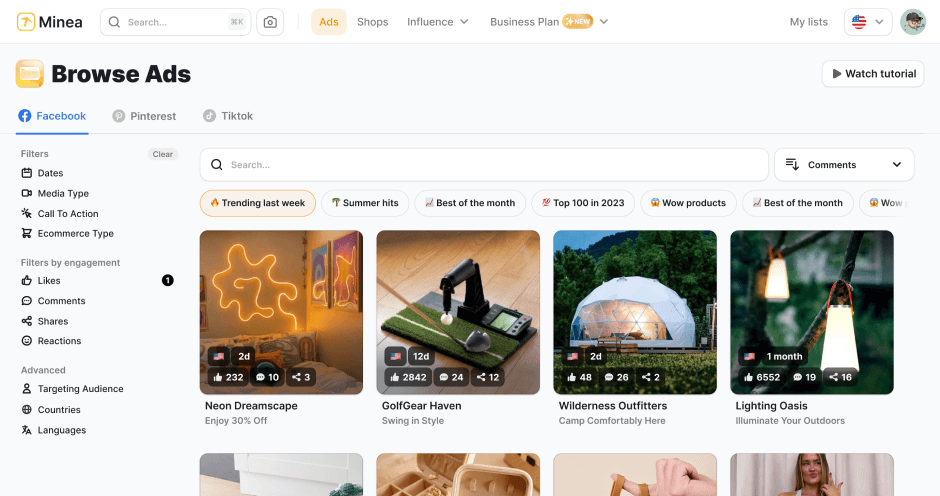
Find winning products on our Tiktok adspy today!
Find winning products on our Pinterest adspy today!
Find winning products on our Facebook adspy today!
Find winning products on our Tiktok adspy today!
Find winning products on our Pinterest adspy today!
Find winning products on our Facebook adspy today!
Find winning products on our Tiktok adspy today!
Find winning products on our Pinterest adspy today!
Find winning products on our Facebook adspy today!
Find winning products on our Tiktok adspy today!
Find winning products on our Pinterest adspy today!
Find winning products on our Facebook adspy today!
1 winning product everyday.
Follow us!



Our Free Adspys
Find winning products on our Tiktok adspy today!
Find winning products on our Pinterest adspy today!
Find winning products on our Facebook adspy today!
Find winning products on our Tiktok adspy today!
Find winning products on our Pinterest adspy today!
Find winning products on our Facebook adspy today!
Find winning products on our Tiktok adspy today!
Find winning products on our Pinterest adspy today!
Find winning products on our Facebook adspy today!
Find winning products on our Tiktok adspy today!
Find winning products on our Pinterest adspy today!
Find winning products on our Facebook adspy today!
1 winning product everyday.
Follow us!
Our Free Adspys
Find winning products on our Tiktok adspy today!
Find winning products on our Pinterest adspy today!
Find winning products on our Facebook adspy today!
Find winning products on our Tiktok adspy today!
Find winning products on our Pinterest adspy today!
Find winning products on our Facebook adspy today!
Find winning products on our Tiktok adspy today!
Find winning products on our Pinterest adspy today!
Find winning products on our Facebook adspy today!
Find winning products on our Tiktok adspy today!
Find winning products on our Pinterest adspy today!
Find winning products on our Facebook adspy today!
1 winning product everyday.
Follow us!




Find out more
Read more
Minea © 2025
Find out more
Read more
Minea © 2025
Find out more
Read more
Minea © 2025
Find out more
Read more
Minea © 2025
Find out more
Read more
Minea © 2025
Find out more
Read more
Minea © 2025
Find out more
Read more
Minea © 2025