How to Connect Alibaba to Shopify in 2025
Dropshipping Platforms
Author: Josa
November 26, 2025
Contents
To connect Alibaba to Shopify, simply install the Alibaba Dropshipping app from the Shopify App Store.
Once it’s set up, link your Shopify store to your Alibaba account, then import and publish your products. The integration automatically syncs inventory and orders between both platforms, making the entire process smooth and efficient.
The best part? It takes less than 10 minutes, as long as you follow the right steps.
In this guide, you’ll learn:
How to set everything up from A to Z
Common mistakes to avoid
How to optimize the integration to save time and start selling faster
To connect Alibaba to Shopify, simply install the Alibaba Dropshipping app from the Shopify App Store.
Once it’s set up, link your Shopify store to your Alibaba account, then import and publish your products. The integration automatically syncs inventory and orders between both platforms, making the entire process smooth and efficient.
The best part? It takes less than 10 minutes, as long as you follow the right steps.
In this guide, you’ll learn:
How to set everything up from A to Z
Common mistakes to avoid
How to optimize the integration to save time and start selling faster
To connect Alibaba to Shopify, simply install the Alibaba Dropshipping app from the Shopify App Store.
Once it’s set up, link your Shopify store to your Alibaba account, then import and publish your products. The integration automatically syncs inventory and orders between both platforms, making the entire process smooth and efficient.
The best part? It takes less than 10 minutes, as long as you follow the right steps.
In this guide, you’ll learn:
How to set everything up from A to Z
Common mistakes to avoid
How to optimize the integration to save time and start selling faster
To connect Alibaba to Shopify, simply install the Alibaba Dropshipping app from the Shopify App Store.
Once it’s set up, link your Shopify store to your Alibaba account, then import and publish your products. The integration automatically syncs inventory and orders between both platforms, making the entire process smooth and efficient.
The best part? It takes less than 10 minutes, as long as you follow the right steps.
In this guide, you’ll learn:
How to set everything up from A to Z
Common mistakes to avoid
How to optimize the integration to save time and start selling faster
To connect Alibaba to Shopify, simply install the Alibaba Dropshipping app from the Shopify App Store.
Once it’s set up, link your Shopify store to your Alibaba account, then import and publish your products. The integration automatically syncs inventory and orders between both platforms, making the entire process smooth and efficient.
The best part? It takes less than 10 minutes, as long as you follow the right steps.
In this guide, you’ll learn:
How to set everything up from A to Z
Common mistakes to avoid
How to optimize the integration to save time and start selling faster
To connect Alibaba to Shopify, simply install the Alibaba Dropshipping app from the Shopify App Store.
Once it’s set up, link your Shopify store to your Alibaba account, then import and publish your products. The integration automatically syncs inventory and orders between both platforms, making the entire process smooth and efficient.
The best part? It takes less than 10 minutes, as long as you follow the right steps.
In this guide, you’ll learn:
How to set everything up from A to Z
Common mistakes to avoid
How to optimize the integration to save time and start selling faster


Steps to Connect Alibaba to Shopify
Want to connect Shopify and Alibaba? The process is straightforward! Just create an Alibaba Dropshipping account, install the app on Shopify, and import your products in a few clicks. Once everything’s synced, your inventory and orders update automatically, giving you more time to focus on scaling your sales. Let’s break it down.
Step 1 — Create an Alibaba Dropshipping Account
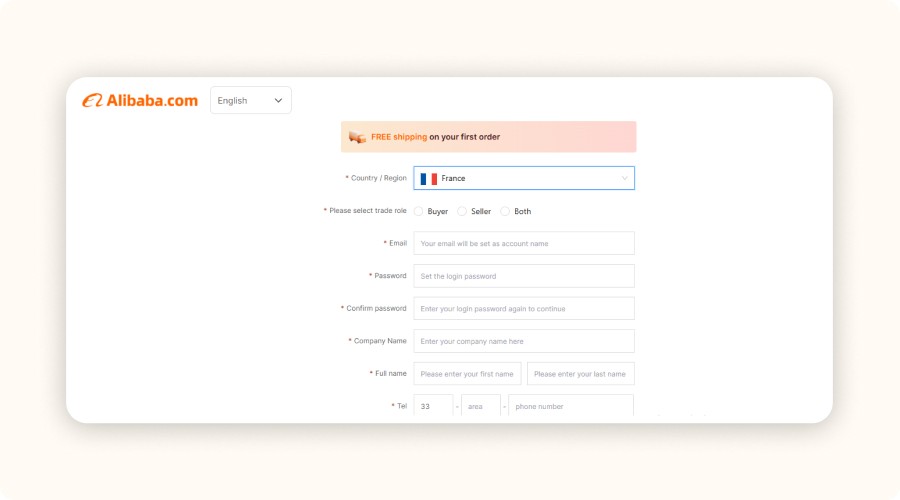
To get started, head over to Alibaba.com and sign up for free using a professional email address.
During registration, choose the Dropshipping option if available.
If not, finish the standard signup and go directly to dropshipping.alibaba.com through the main menu.
This dedicated dashboard is where everything happens:
Access to verified dropshipping suppliers
Ready-to-import products
Built-in management tools
Without this specific account, you can’t connect Alibaba to Shopify.
Make sure to complete your profile (name, business, phone number). Some suppliers block incomplete profiles. You don’t need a VAT number if you’re just starting out. Remember, this isn’t just a formality. Your Alibaba Dropshipping account gives you access to valuable features like order tracking, import history, and supplier performance tools.
Step 2 — Install the Alibaba Shopify Integration App
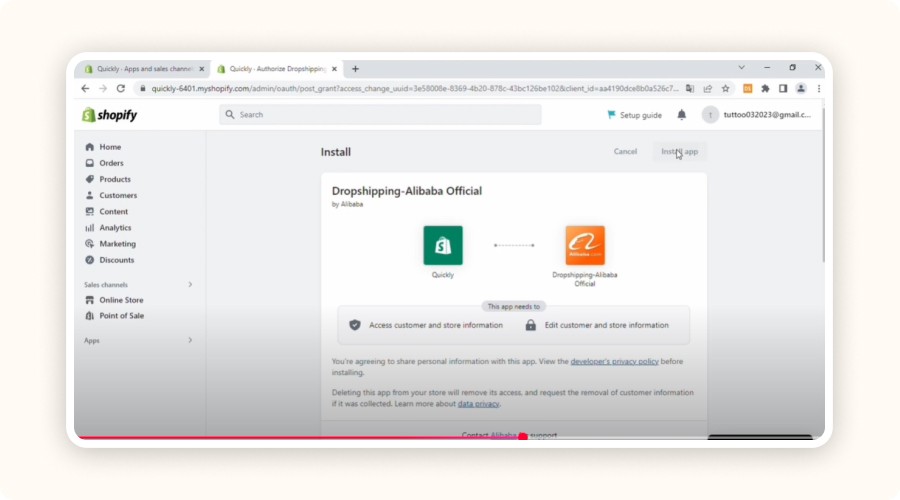
Open your Shopify dashboard, head to the Shopify App Store, and search for “Alibaba Dropshipping” or “Alibaba Shopify Integration.” Click Install.
Once installed, log in with your Alibaba credentials.
Shopify will ask you to approve several permissions, accept them so the integration can import products, sync inventory, and automate orders.
The app creates a direct link between your store and Alibaba. After setup, you can:
Import products in one click
Manage variants and set pricing
Publish items instantly
If you manage multiple Shopify stores, double-check that you’ve connected the right one. Also, make sure automatic inventory sync is enabled in the settings, this prevents unexpected stockouts.
Step 3 — Research and Select Reliable Suppliers
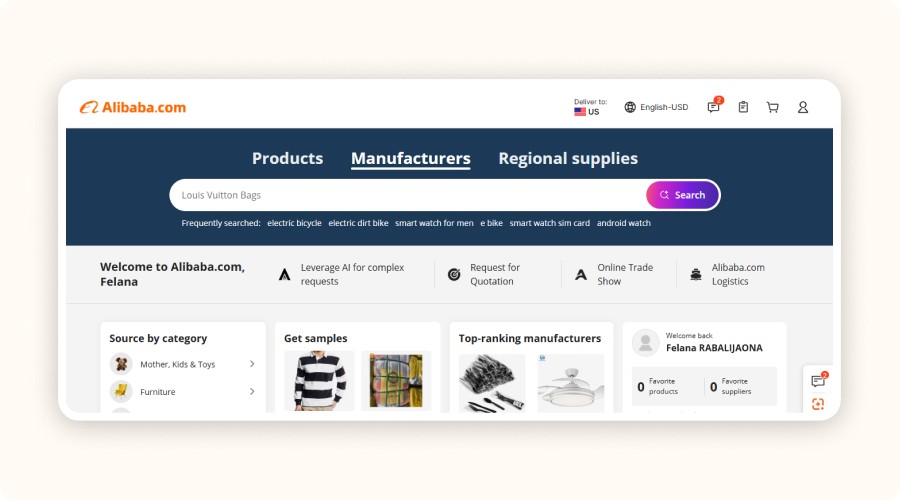
Not every seller on Alibaba is suitable for dropshipping. To avoid bad experiences, always use the “Verified Supplier” and “Trade Assurance” filters. These guarantee that the supplier has been audited and meets quality and delivery standards.
Also, check supplier ratings and the number of successful transactions. Reliable partners usually have ratings above 4.5 and positive customer feedback.
Finally, pay attention to shipping times. A product that takes 40 days to arrive will drive customers away.
Step 4 — Import Alibaba Products to Shopify
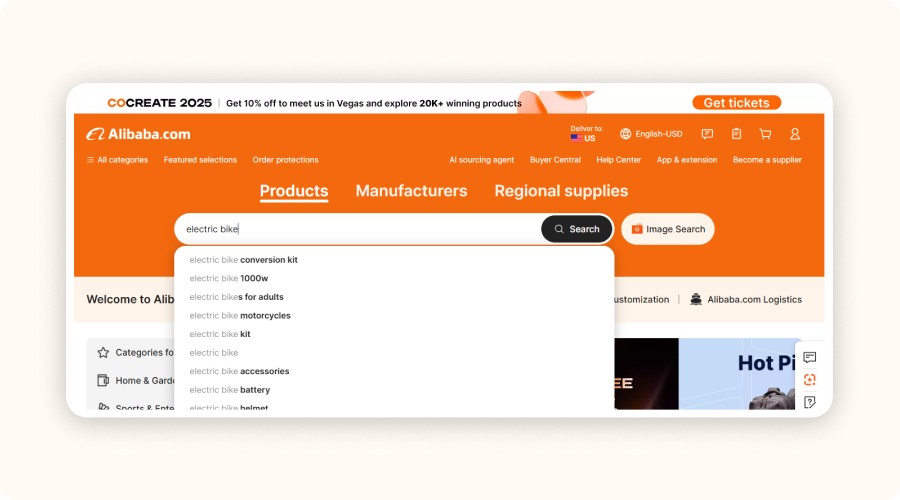
Search for products directly from the Alibaba app integrated with Shopify. Use the search bar or filters to find items that match your niche. Take the time to compare prices, delivery times, and reviews before adding anything to your store.
To import, click “Add to Shopify.” The product will appear as a draft listing ready for customization.
Before publishing, make sure each product page includes:
A clear, keyword-rich title
A simple and persuasive description tailored to your audience
High-quality images (add extra visuals if the supplier provides too few)
A well-optimized product page helps you stand out from competitors, improve SEO, and increase conversions.
Step 5 — Manage Inventory and Orders
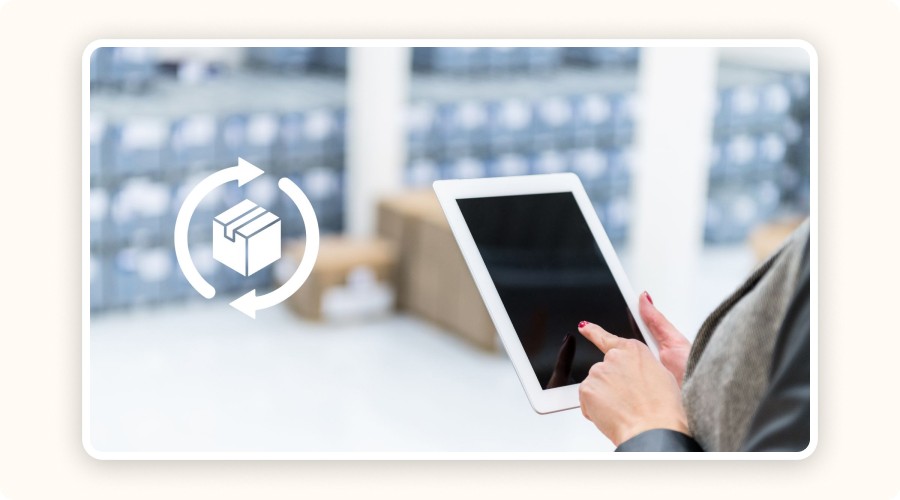
Once your Alibaba app is connected, your inventory and orders update automatically. When a customer buys from your Shopify store, the order is instantly sent to the supplier on Alibaba, no manual action needed.
If a product goes out of stock on Alibaba, that status automatically syncs with Shopify, preventing overselling and keeping your customers happy.
From your Shopify dashboard, you can track all orders in real time and ensure fast fulfillment. This automation saves time, reduces human error, and helps maintain a smooth, reliable order flow.
Step 6 — Analyze and Optimize Your Sales

Shopify provides a powerful tool called Shopify Analytics, a real-time dashboard showing:
Your total sales and margins
Customer behavior and purchase trends
Conversion rate and traffic sources
Use these insights to identify your top-performing products and adjust your pricing or listings accordingly.
If an item performs well, try new variants or slightly raise the price to increase your profit margins. If another product underperforms, rewrite its title and description, improve the visuals, or test a new supplier.
Don’t ignore your marketing data either, metrics like average order value, conversion rate, and traffic origin help refine your ad campaigns and pricing strategy. By regularly analyzing your results, you’ll turn your Shopify store into a profitable and scalable business, not a stagnant one.
Steps to Connect Alibaba to Shopify
Want to connect Shopify and Alibaba? The process is straightforward! Just create an Alibaba Dropshipping account, install the app on Shopify, and import your products in a few clicks. Once everything’s synced, your inventory and orders update automatically, giving you more time to focus on scaling your sales. Let’s break it down.
Step 1 — Create an Alibaba Dropshipping Account
To get started, head over to Alibaba.com and sign up for free using a professional email address.
During registration, choose the Dropshipping option if available.
If not, finish the standard signup and go directly to dropshipping.alibaba.com through the main menu.
This dedicated dashboard is where everything happens:
Access to verified dropshipping suppliers
Ready-to-import products
Built-in management tools
Without this specific account, you can’t connect Alibaba to Shopify.
Make sure to complete your profile (name, business, phone number). Some suppliers block incomplete profiles. You don’t need a VAT number if you’re just starting out. Remember, this isn’t just a formality. Your Alibaba Dropshipping account gives you access to valuable features like order tracking, import history, and supplier performance tools.
Step 2 — Install the Alibaba Shopify Integration App
Open your Shopify dashboard, head to the Shopify App Store, and search for “Alibaba Dropshipping” or “Alibaba Shopify Integration.” Click Install.
Once installed, log in with your Alibaba credentials.
Shopify will ask you to approve several permissions, accept them so the integration can import products, sync inventory, and automate orders.
The app creates a direct link between your store and Alibaba. After setup, you can:
Import products in one click
Manage variants and set pricing
Publish items instantly
If you manage multiple Shopify stores, double-check that you’ve connected the right one. Also, make sure automatic inventory sync is enabled in the settings, this prevents unexpected stockouts.
Step 3 — Research and Select Reliable Suppliers
Not every seller on Alibaba is suitable for dropshipping. To avoid bad experiences, always use the “Verified Supplier” and “Trade Assurance” filters. These guarantee that the supplier has been audited and meets quality and delivery standards.
Also, check supplier ratings and the number of successful transactions. Reliable partners usually have ratings above 4.5 and positive customer feedback.
Finally, pay attention to shipping times. A product that takes 40 days to arrive will drive customers away.
Step 4 — Import Alibaba Products to Shopify
Search for products directly from the Alibaba app integrated with Shopify. Use the search bar or filters to find items that match your niche. Take the time to compare prices, delivery times, and reviews before adding anything to your store.
To import, click “Add to Shopify.” The product will appear as a draft listing ready for customization.
Before publishing, make sure each product page includes:
A clear, keyword-rich title
A simple and persuasive description tailored to your audience
High-quality images (add extra visuals if the supplier provides too few)
A well-optimized product page helps you stand out from competitors, improve SEO, and increase conversions.
Step 5 — Manage Inventory and Orders
Once your Alibaba app is connected, your inventory and orders update automatically. When a customer buys from your Shopify store, the order is instantly sent to the supplier on Alibaba, no manual action needed.
If a product goes out of stock on Alibaba, that status automatically syncs with Shopify, preventing overselling and keeping your customers happy.
From your Shopify dashboard, you can track all orders in real time and ensure fast fulfillment. This automation saves time, reduces human error, and helps maintain a smooth, reliable order flow.
Step 6 — Analyze and Optimize Your Sales
Shopify provides a powerful tool called Shopify Analytics, a real-time dashboard showing:
Your total sales and margins
Customer behavior and purchase trends
Conversion rate and traffic sources
Use these insights to identify your top-performing products and adjust your pricing or listings accordingly.
If an item performs well, try new variants or slightly raise the price to increase your profit margins. If another product underperforms, rewrite its title and description, improve the visuals, or test a new supplier.
Don’t ignore your marketing data either, metrics like average order value, conversion rate, and traffic origin help refine your ad campaigns and pricing strategy. By regularly analyzing your results, you’ll turn your Shopify store into a profitable and scalable business, not a stagnant one.
Steps to Connect Alibaba to Shopify
Want to connect Shopify and Alibaba? The process is straightforward! Just create an Alibaba Dropshipping account, install the app on Shopify, and import your products in a few clicks. Once everything’s synced, your inventory and orders update automatically, giving you more time to focus on scaling your sales. Let’s break it down.
Step 1 — Create an Alibaba Dropshipping Account
To get started, head over to Alibaba.com and sign up for free using a professional email address.
During registration, choose the Dropshipping option if available.
If not, finish the standard signup and go directly to dropshipping.alibaba.com through the main menu.
This dedicated dashboard is where everything happens:
Access to verified dropshipping suppliers
Ready-to-import products
Built-in management tools
Without this specific account, you can’t connect Alibaba to Shopify.
Make sure to complete your profile (name, business, phone number). Some suppliers block incomplete profiles. You don’t need a VAT number if you’re just starting out. Remember, this isn’t just a formality. Your Alibaba Dropshipping account gives you access to valuable features like order tracking, import history, and supplier performance tools.
Step 2 — Install the Alibaba Shopify Integration App
Open your Shopify dashboard, head to the Shopify App Store, and search for “Alibaba Dropshipping” or “Alibaba Shopify Integration.” Click Install.
Once installed, log in with your Alibaba credentials.
Shopify will ask you to approve several permissions, accept them so the integration can import products, sync inventory, and automate orders.
The app creates a direct link between your store and Alibaba. After setup, you can:
Import products in one click
Manage variants and set pricing
Publish items instantly
If you manage multiple Shopify stores, double-check that you’ve connected the right one. Also, make sure automatic inventory sync is enabled in the settings, this prevents unexpected stockouts.
Step 3 — Research and Select Reliable Suppliers
Not every seller on Alibaba is suitable for dropshipping. To avoid bad experiences, always use the “Verified Supplier” and “Trade Assurance” filters. These guarantee that the supplier has been audited and meets quality and delivery standards.
Also, check supplier ratings and the number of successful transactions. Reliable partners usually have ratings above 4.5 and positive customer feedback.
Finally, pay attention to shipping times. A product that takes 40 days to arrive will drive customers away.
Step 4 — Import Alibaba Products to Shopify
Search for products directly from the Alibaba app integrated with Shopify. Use the search bar or filters to find items that match your niche. Take the time to compare prices, delivery times, and reviews before adding anything to your store.
To import, click “Add to Shopify.” The product will appear as a draft listing ready for customization.
Before publishing, make sure each product page includes:
A clear, keyword-rich title
A simple and persuasive description tailored to your audience
High-quality images (add extra visuals if the supplier provides too few)
A well-optimized product page helps you stand out from competitors, improve SEO, and increase conversions.
Step 5 — Manage Inventory and Orders
Once your Alibaba app is connected, your inventory and orders update automatically. When a customer buys from your Shopify store, the order is instantly sent to the supplier on Alibaba, no manual action needed.
If a product goes out of stock on Alibaba, that status automatically syncs with Shopify, preventing overselling and keeping your customers happy.
From your Shopify dashboard, you can track all orders in real time and ensure fast fulfillment. This automation saves time, reduces human error, and helps maintain a smooth, reliable order flow.
Step 6 — Analyze and Optimize Your Sales
Shopify provides a powerful tool called Shopify Analytics, a real-time dashboard showing:
Your total sales and margins
Customer behavior and purchase trends
Conversion rate and traffic sources
Use these insights to identify your top-performing products and adjust your pricing or listings accordingly.
If an item performs well, try new variants or slightly raise the price to increase your profit margins. If another product underperforms, rewrite its title and description, improve the visuals, or test a new supplier.
Don’t ignore your marketing data either, metrics like average order value, conversion rate, and traffic origin help refine your ad campaigns and pricing strategy. By regularly analyzing your results, you’ll turn your Shopify store into a profitable and scalable business, not a stagnant one.
Steps to Connect Alibaba to Shopify
Want to connect Shopify and Alibaba? The process is straightforward! Just create an Alibaba Dropshipping account, install the app on Shopify, and import your products in a few clicks. Once everything’s synced, your inventory and orders update automatically, giving you more time to focus on scaling your sales. Let’s break it down.
Step 1 — Create an Alibaba Dropshipping Account
To get started, head over to Alibaba.com and sign up for free using a professional email address.
During registration, choose the Dropshipping option if available.
If not, finish the standard signup and go directly to dropshipping.alibaba.com through the main menu.
This dedicated dashboard is where everything happens:
Access to verified dropshipping suppliers
Ready-to-import products
Built-in management tools
Without this specific account, you can’t connect Alibaba to Shopify.
Make sure to complete your profile (name, business, phone number). Some suppliers block incomplete profiles. You don’t need a VAT number if you’re just starting out. Remember, this isn’t just a formality. Your Alibaba Dropshipping account gives you access to valuable features like order tracking, import history, and supplier performance tools.
Step 2 — Install the Alibaba Shopify Integration App
Open your Shopify dashboard, head to the Shopify App Store, and search for “Alibaba Dropshipping” or “Alibaba Shopify Integration.” Click Install.
Once installed, log in with your Alibaba credentials.
Shopify will ask you to approve several permissions, accept them so the integration can import products, sync inventory, and automate orders.
The app creates a direct link between your store and Alibaba. After setup, you can:
Import products in one click
Manage variants and set pricing
Publish items instantly
If you manage multiple Shopify stores, double-check that you’ve connected the right one. Also, make sure automatic inventory sync is enabled in the settings, this prevents unexpected stockouts.
Step 3 — Research and Select Reliable Suppliers
Not every seller on Alibaba is suitable for dropshipping. To avoid bad experiences, always use the “Verified Supplier” and “Trade Assurance” filters. These guarantee that the supplier has been audited and meets quality and delivery standards.
Also, check supplier ratings and the number of successful transactions. Reliable partners usually have ratings above 4.5 and positive customer feedback.
Finally, pay attention to shipping times. A product that takes 40 days to arrive will drive customers away.
Step 4 — Import Alibaba Products to Shopify
Search for products directly from the Alibaba app integrated with Shopify. Use the search bar or filters to find items that match your niche. Take the time to compare prices, delivery times, and reviews before adding anything to your store.
To import, click “Add to Shopify.” The product will appear as a draft listing ready for customization.
Before publishing, make sure each product page includes:
A clear, keyword-rich title
A simple and persuasive description tailored to your audience
High-quality images (add extra visuals if the supplier provides too few)
A well-optimized product page helps you stand out from competitors, improve SEO, and increase conversions.
Step 5 — Manage Inventory and Orders
Once your Alibaba app is connected, your inventory and orders update automatically. When a customer buys from your Shopify store, the order is instantly sent to the supplier on Alibaba, no manual action needed.
If a product goes out of stock on Alibaba, that status automatically syncs with Shopify, preventing overselling and keeping your customers happy.
From your Shopify dashboard, you can track all orders in real time and ensure fast fulfillment. This automation saves time, reduces human error, and helps maintain a smooth, reliable order flow.
Step 6 — Analyze and Optimize Your Sales
Shopify provides a powerful tool called Shopify Analytics, a real-time dashboard showing:
Your total sales and margins
Customer behavior and purchase trends
Conversion rate and traffic sources
Use these insights to identify your top-performing products and adjust your pricing or listings accordingly.
If an item performs well, try new variants or slightly raise the price to increase your profit margins. If another product underperforms, rewrite its title and description, improve the visuals, or test a new supplier.
Don’t ignore your marketing data either, metrics like average order value, conversion rate, and traffic origin help refine your ad campaigns and pricing strategy. By regularly analyzing your results, you’ll turn your Shopify store into a profitable and scalable business, not a stagnant one.
Steps to Connect Alibaba to Shopify
Want to connect Shopify and Alibaba? The process is straightforward! Just create an Alibaba Dropshipping account, install the app on Shopify, and import your products in a few clicks. Once everything’s synced, your inventory and orders update automatically, giving you more time to focus on scaling your sales. Let’s break it down.
Step 1 — Create an Alibaba Dropshipping Account
To get started, head over to Alibaba.com and sign up for free using a professional email address.
During registration, choose the Dropshipping option if available.
If not, finish the standard signup and go directly to dropshipping.alibaba.com through the main menu.
This dedicated dashboard is where everything happens:
Access to verified dropshipping suppliers
Ready-to-import products
Built-in management tools
Without this specific account, you can’t connect Alibaba to Shopify.
Make sure to complete your profile (name, business, phone number). Some suppliers block incomplete profiles. You don’t need a VAT number if you’re just starting out. Remember, this isn’t just a formality. Your Alibaba Dropshipping account gives you access to valuable features like order tracking, import history, and supplier performance tools.
Step 2 — Install the Alibaba Shopify Integration App
Open your Shopify dashboard, head to the Shopify App Store, and search for “Alibaba Dropshipping” or “Alibaba Shopify Integration.” Click Install.
Once installed, log in with your Alibaba credentials.
Shopify will ask you to approve several permissions, accept them so the integration can import products, sync inventory, and automate orders.
The app creates a direct link between your store and Alibaba. After setup, you can:
Import products in one click
Manage variants and set pricing
Publish items instantly
If you manage multiple Shopify stores, double-check that you’ve connected the right one. Also, make sure automatic inventory sync is enabled in the settings, this prevents unexpected stockouts.
Step 3 — Research and Select Reliable Suppliers
Not every seller on Alibaba is suitable for dropshipping. To avoid bad experiences, always use the “Verified Supplier” and “Trade Assurance” filters. These guarantee that the supplier has been audited and meets quality and delivery standards.
Also, check supplier ratings and the number of successful transactions. Reliable partners usually have ratings above 4.5 and positive customer feedback.
Finally, pay attention to shipping times. A product that takes 40 days to arrive will drive customers away.
Step 4 — Import Alibaba Products to Shopify
Search for products directly from the Alibaba app integrated with Shopify. Use the search bar or filters to find items that match your niche. Take the time to compare prices, delivery times, and reviews before adding anything to your store.
To import, click “Add to Shopify.” The product will appear as a draft listing ready for customization.
Before publishing, make sure each product page includes:
A clear, keyword-rich title
A simple and persuasive description tailored to your audience
High-quality images (add extra visuals if the supplier provides too few)
A well-optimized product page helps you stand out from competitors, improve SEO, and increase conversions.
Step 5 — Manage Inventory and Orders
Once your Alibaba app is connected, your inventory and orders update automatically. When a customer buys from your Shopify store, the order is instantly sent to the supplier on Alibaba, no manual action needed.
If a product goes out of stock on Alibaba, that status automatically syncs with Shopify, preventing overselling and keeping your customers happy.
From your Shopify dashboard, you can track all orders in real time and ensure fast fulfillment. This automation saves time, reduces human error, and helps maintain a smooth, reliable order flow.
Step 6 — Analyze and Optimize Your Sales
Shopify provides a powerful tool called Shopify Analytics, a real-time dashboard showing:
Your total sales and margins
Customer behavior and purchase trends
Conversion rate and traffic sources
Use these insights to identify your top-performing products and adjust your pricing or listings accordingly.
If an item performs well, try new variants or slightly raise the price to increase your profit margins. If another product underperforms, rewrite its title and description, improve the visuals, or test a new supplier.
Don’t ignore your marketing data either, metrics like average order value, conversion rate, and traffic origin help refine your ad campaigns and pricing strategy. By regularly analyzing your results, you’ll turn your Shopify store into a profitable and scalable business, not a stagnant one.
Steps to Connect Alibaba to Shopify
Want to connect Shopify and Alibaba? The process is straightforward! Just create an Alibaba Dropshipping account, install the app on Shopify, and import your products in a few clicks. Once everything’s synced, your inventory and orders update automatically, giving you more time to focus on scaling your sales. Let’s break it down.
Step 1 — Create an Alibaba Dropshipping Account
To get started, head over to Alibaba.com and sign up for free using a professional email address.
During registration, choose the Dropshipping option if available.
If not, finish the standard signup and go directly to dropshipping.alibaba.com through the main menu.
This dedicated dashboard is where everything happens:
Access to verified dropshipping suppliers
Ready-to-import products
Built-in management tools
Without this specific account, you can’t connect Alibaba to Shopify.
Make sure to complete your profile (name, business, phone number). Some suppliers block incomplete profiles. You don’t need a VAT number if you’re just starting out. Remember, this isn’t just a formality. Your Alibaba Dropshipping account gives you access to valuable features like order tracking, import history, and supplier performance tools.
Step 2 — Install the Alibaba Shopify Integration App
Open your Shopify dashboard, head to the Shopify App Store, and search for “Alibaba Dropshipping” or “Alibaba Shopify Integration.” Click Install.
Once installed, log in with your Alibaba credentials.
Shopify will ask you to approve several permissions, accept them so the integration can import products, sync inventory, and automate orders.
The app creates a direct link between your store and Alibaba. After setup, you can:
Import products in one click
Manage variants and set pricing
Publish items instantly
If you manage multiple Shopify stores, double-check that you’ve connected the right one. Also, make sure automatic inventory sync is enabled in the settings, this prevents unexpected stockouts.
Step 3 — Research and Select Reliable Suppliers
Not every seller on Alibaba is suitable for dropshipping. To avoid bad experiences, always use the “Verified Supplier” and “Trade Assurance” filters. These guarantee that the supplier has been audited and meets quality and delivery standards.
Also, check supplier ratings and the number of successful transactions. Reliable partners usually have ratings above 4.5 and positive customer feedback.
Finally, pay attention to shipping times. A product that takes 40 days to arrive will drive customers away.
Step 4 — Import Alibaba Products to Shopify
Search for products directly from the Alibaba app integrated with Shopify. Use the search bar or filters to find items that match your niche. Take the time to compare prices, delivery times, and reviews before adding anything to your store.
To import, click “Add to Shopify.” The product will appear as a draft listing ready for customization.
Before publishing, make sure each product page includes:
A clear, keyword-rich title
A simple and persuasive description tailored to your audience
High-quality images (add extra visuals if the supplier provides too few)
A well-optimized product page helps you stand out from competitors, improve SEO, and increase conversions.
Step 5 — Manage Inventory and Orders
Once your Alibaba app is connected, your inventory and orders update automatically. When a customer buys from your Shopify store, the order is instantly sent to the supplier on Alibaba, no manual action needed.
If a product goes out of stock on Alibaba, that status automatically syncs with Shopify, preventing overselling and keeping your customers happy.
From your Shopify dashboard, you can track all orders in real time and ensure fast fulfillment. This automation saves time, reduces human error, and helps maintain a smooth, reliable order flow.
Step 6 — Analyze and Optimize Your Sales
Shopify provides a powerful tool called Shopify Analytics, a real-time dashboard showing:
Your total sales and margins
Customer behavior and purchase trends
Conversion rate and traffic sources
Use these insights to identify your top-performing products and adjust your pricing or listings accordingly.
If an item performs well, try new variants or slightly raise the price to increase your profit margins. If another product underperforms, rewrite its title and description, improve the visuals, or test a new supplier.
Don’t ignore your marketing data either, metrics like average order value, conversion rate, and traffic origin help refine your ad campaigns and pricing strategy. By regularly analyzing your results, you’ll turn your Shopify store into a profitable and scalable business, not a stagnant one.

Take a Shortcut
Intensive coaching, $1,000/day guaranteed or your money back

Take a Shortcut
Intensive coaching, $1,000/day guaranteed or your money back
Take a Shortcut
Intensive coaching, $1,000/day guaranteed or your money back
Take a Shortcut
Intensive coaching, $1,000/day guaranteed or your money back
Take a Shortcut
Intensive coaching, $1,000/day guaranteed or your money back
Take a Shortcut
Intensive coaching, $1,000/day guaranteed or your money back
Why Connect Alibaba to Shopify in 2025?

Alibaba isn’t just another B2C marketplace, it’s a legitimate B2B platform that connects you directly with manufacturers and suppliers. This gives you access to:
Much more competitive prices
Flexible order volumes suited for dropshipping
Product customization options such as logos, packaging, or variants
Unlike AliExpress, which mainly offers standardized catalog products, Alibaba opens the door to white-label dropshipping and higher profit margins.
Because Alibaba is free to use, you work with professional suppliers that can help you build a long-term brand rather than just selling generic items.
When integrated with Shopify, the process becomes seamless, no manual product or inventory management required. You can focus entirely on what matters most:
Choosing winning products
Optimizing product pages for SEO
Scaling your sales efficiently
In short, Alibaba + Shopify is the winning equation for building a profitable, scalable online store in 2025.
What Are the Limitations of the Alibaba–Shopify Integration?

The integration between Alibaba and Shopify makes dropshipping simple. It’s one of the best e-commerce platforms for small businesses.However, it’s not perfect! For a successful business, you need to understand its limitations.
1. Delivery Times
Even though some suppliers have warehouses in the US or Europe, most still ship from China. This means longer delivery times compared to Amazon or local competitors.
To avoid customer frustration, set clear expectations and, whenever possible, work with suppliers offering faster shipping.
2. Minimum Order Quantity (MOQ)
Unlike AliExpress, some Alibaba suppliers require a minimum order quantity (MOQ). Not all of them are suitable for dropshipping, so filter carefully and discuss terms with your supplier before listing products in your store.
3. Inconsistent Quality
All suppliers aren’t equal. Without ordering samples, you risk selling low-quality products that may disappoint your customers.
Always test your products first to ensure quality and maintain a good reputation.
4. Limited Supplier Support
Some suppliers can be slow to respond to messages or complaints.
To offset this, make sure your Shopify customer support is responsive and well-organized, so buyers don’t feel neglected.
Best Practices for Dropshipping with Alibaba and Shopify
Connecting Alibaba to Shopify is easy, but to build a sustainable dropshipping business, you need to follow a few best practices. Here’s how to make it work smoothly and profitably.
1. Choose the Right Suppliers
Everything starts with your supplier.
Use Alibaba’s Verified Supplier and Trade Assurance filters to find trustworthy partners.
Check their ratings, customer reviews, and response times.
Avoid suppliers with slow delivery or no experience in dropshipping, reliability is key.
2. Always Order a Sample
Before listing any product, place a test order.
This allows you to evaluate product quality, packaging, and real delivery times.
With a sample, you know exactly what to expect, and you’ll avoid selling disappointing products to your customers.
3. Optimize Every Product Listing
Never keep the default Alibaba description. Rewrite your product description to stand out:
Write a clear, keyword-focused title
Add relevant keywords for SEO
Rewrite the description to fit your brand tone
Include high-quality photos, or add new ones if needed
A well-crafted product page boosts visibility, builds trust, and drives conversions.
4. Set Your Margins Early
Alibaba’s prices are low, but that doesn’t mean you can sell at any price.
Calculate your real costs, including product cost, shipping, and ad spend. Then set a sustainable margin. Selling at a loss, even in volume, will only hurt your business long term.
5. Automate Your Dropshipping Operations
Enable automatic synchronization between Alibaba and Shopify.
This prevents stockouts and order errors.
The more streamlined your system, the fewer issues you’ll have with customers, and the more time you’ll save.
6. Track Your Performance
Regularly analyze your results through Shopify Analytics. Spot your best-selling products, adjust prices when needed, and quickly remove underperforming items. Remember, dropshipping is a continuous testing process, stay agile and keep improving.
7. Provide Excellent Customer Service
Even if you can’t control shipping delays, you can control communication. A quick, clear response can turn a potential complaint into a loyal customer.
For flawless customer service:
Set up automated email responses
Be transparent about delivery times
Respond quickly to inquiries
Good communication builds trust, and trust drives repeat sales.
Why Connect Alibaba to Shopify in 2025?
Alibaba isn’t just another B2C marketplace, it’s a legitimate B2B platform that connects you directly with manufacturers and suppliers. This gives you access to:
Much more competitive prices
Flexible order volumes suited for dropshipping
Product customization options such as logos, packaging, or variants
Unlike AliExpress, which mainly offers standardized catalog products, Alibaba opens the door to white-label dropshipping and higher profit margins.
Because Alibaba is free to use, you work with professional suppliers that can help you build a long-term brand rather than just selling generic items.
When integrated with Shopify, the process becomes seamless, no manual product or inventory management required. You can focus entirely on what matters most:
Choosing winning products
Optimizing product pages for SEO
Scaling your sales efficiently
In short, Alibaba + Shopify is the winning equation for building a profitable, scalable online store in 2025.
What Are the Limitations of the Alibaba–Shopify Integration?
The integration between Alibaba and Shopify makes dropshipping simple. It’s one of the best e-commerce platforms for small businesses.However, it’s not perfect! For a successful business, you need to understand its limitations.
1. Delivery Times
Even though some suppliers have warehouses in the US or Europe, most still ship from China. This means longer delivery times compared to Amazon or local competitors.
To avoid customer frustration, set clear expectations and, whenever possible, work with suppliers offering faster shipping.
2. Minimum Order Quantity (MOQ)
Unlike AliExpress, some Alibaba suppliers require a minimum order quantity (MOQ). Not all of them are suitable for dropshipping, so filter carefully and discuss terms with your supplier before listing products in your store.
3. Inconsistent Quality
All suppliers aren’t equal. Without ordering samples, you risk selling low-quality products that may disappoint your customers.
Always test your products first to ensure quality and maintain a good reputation.
4. Limited Supplier Support
Some suppliers can be slow to respond to messages or complaints.
To offset this, make sure your Shopify customer support is responsive and well-organized, so buyers don’t feel neglected.
Best Practices for Dropshipping with Alibaba and Shopify
Connecting Alibaba to Shopify is easy, but to build a sustainable dropshipping business, you need to follow a few best practices. Here’s how to make it work smoothly and profitably.
1. Choose the Right Suppliers
Everything starts with your supplier.
Use Alibaba’s Verified Supplier and Trade Assurance filters to find trustworthy partners.
Check their ratings, customer reviews, and response times.
Avoid suppliers with slow delivery or no experience in dropshipping, reliability is key.
2. Always Order a Sample
Before listing any product, place a test order.
This allows you to evaluate product quality, packaging, and real delivery times.
With a sample, you know exactly what to expect, and you’ll avoid selling disappointing products to your customers.
3. Optimize Every Product Listing
Never keep the default Alibaba description. Rewrite your product description to stand out:
Write a clear, keyword-focused title
Add relevant keywords for SEO
Rewrite the description to fit your brand tone
Include high-quality photos, or add new ones if needed
A well-crafted product page boosts visibility, builds trust, and drives conversions.
4. Set Your Margins Early
Alibaba’s prices are low, but that doesn’t mean you can sell at any price.
Calculate your real costs, including product cost, shipping, and ad spend. Then set a sustainable margin. Selling at a loss, even in volume, will only hurt your business long term.
5. Automate Your Dropshipping Operations
Enable automatic synchronization between Alibaba and Shopify.
This prevents stockouts and order errors.
The more streamlined your system, the fewer issues you’ll have with customers, and the more time you’ll save.
6. Track Your Performance
Regularly analyze your results through Shopify Analytics. Spot your best-selling products, adjust prices when needed, and quickly remove underperforming items. Remember, dropshipping is a continuous testing process, stay agile and keep improving.
7. Provide Excellent Customer Service
Even if you can’t control shipping delays, you can control communication. A quick, clear response can turn a potential complaint into a loyal customer.
For flawless customer service:
Set up automated email responses
Be transparent about delivery times
Respond quickly to inquiries
Good communication builds trust, and trust drives repeat sales.
Why Connect Alibaba to Shopify in 2025?
Alibaba isn’t just another B2C marketplace, it’s a legitimate B2B platform that connects you directly with manufacturers and suppliers. This gives you access to:
Much more competitive prices
Flexible order volumes suited for dropshipping
Product customization options such as logos, packaging, or variants
Unlike AliExpress, which mainly offers standardized catalog products, Alibaba opens the door to white-label dropshipping and higher profit margins.
Because Alibaba is free to use, you work with professional suppliers that can help you build a long-term brand rather than just selling generic items.
When integrated with Shopify, the process becomes seamless, no manual product or inventory management required. You can focus entirely on what matters most:
Choosing winning products
Optimizing product pages for SEO
Scaling your sales efficiently
In short, Alibaba + Shopify is the winning equation for building a profitable, scalable online store in 2025.
What Are the Limitations of the Alibaba–Shopify Integration?
The integration between Alibaba and Shopify makes dropshipping simple. It’s one of the best e-commerce platforms for small businesses.However, it’s not perfect! For a successful business, you need to understand its limitations.
1. Delivery Times
Even though some suppliers have warehouses in the US or Europe, most still ship from China. This means longer delivery times compared to Amazon or local competitors.
To avoid customer frustration, set clear expectations and, whenever possible, work with suppliers offering faster shipping.
2. Minimum Order Quantity (MOQ)
Unlike AliExpress, some Alibaba suppliers require a minimum order quantity (MOQ). Not all of them are suitable for dropshipping, so filter carefully and discuss terms with your supplier before listing products in your store.
3. Inconsistent Quality
All suppliers aren’t equal. Without ordering samples, you risk selling low-quality products that may disappoint your customers.
Always test your products first to ensure quality and maintain a good reputation.
4. Limited Supplier Support
Some suppliers can be slow to respond to messages or complaints.
To offset this, make sure your Shopify customer support is responsive and well-organized, so buyers don’t feel neglected.
Best Practices for Dropshipping with Alibaba and Shopify
Connecting Alibaba to Shopify is easy, but to build a sustainable dropshipping business, you need to follow a few best practices. Here’s how to make it work smoothly and profitably.
1. Choose the Right Suppliers
Everything starts with your supplier.
Use Alibaba’s Verified Supplier and Trade Assurance filters to find trustworthy partners.
Check their ratings, customer reviews, and response times.
Avoid suppliers with slow delivery or no experience in dropshipping, reliability is key.
2. Always Order a Sample
Before listing any product, place a test order.
This allows you to evaluate product quality, packaging, and real delivery times.
With a sample, you know exactly what to expect, and you’ll avoid selling disappointing products to your customers.
3. Optimize Every Product Listing
Never keep the default Alibaba description. Rewrite your product description to stand out:
Write a clear, keyword-focused title
Add relevant keywords for SEO
Rewrite the description to fit your brand tone
Include high-quality photos, or add new ones if needed
A well-crafted product page boosts visibility, builds trust, and drives conversions.
4. Set Your Margins Early
Alibaba’s prices are low, but that doesn’t mean you can sell at any price.
Calculate your real costs, including product cost, shipping, and ad spend. Then set a sustainable margin. Selling at a loss, even in volume, will only hurt your business long term.
5. Automate Your Dropshipping Operations
Enable automatic synchronization between Alibaba and Shopify.
This prevents stockouts and order errors.
The more streamlined your system, the fewer issues you’ll have with customers, and the more time you’ll save.
6. Track Your Performance
Regularly analyze your results through Shopify Analytics. Spot your best-selling products, adjust prices when needed, and quickly remove underperforming items. Remember, dropshipping is a continuous testing process, stay agile and keep improving.
7. Provide Excellent Customer Service
Even if you can’t control shipping delays, you can control communication. A quick, clear response can turn a potential complaint into a loyal customer.
For flawless customer service:
Set up automated email responses
Be transparent about delivery times
Respond quickly to inquiries
Good communication builds trust, and trust drives repeat sales.
Why Connect Alibaba to Shopify in 2025?
Alibaba isn’t just another B2C marketplace, it’s a legitimate B2B platform that connects you directly with manufacturers and suppliers. This gives you access to:
Much more competitive prices
Flexible order volumes suited for dropshipping
Product customization options such as logos, packaging, or variants
Unlike AliExpress, which mainly offers standardized catalog products, Alibaba opens the door to white-label dropshipping and higher profit margins.
Because Alibaba is free to use, you work with professional suppliers that can help you build a long-term brand rather than just selling generic items.
When integrated with Shopify, the process becomes seamless, no manual product or inventory management required. You can focus entirely on what matters most:
Choosing winning products
Optimizing product pages for SEO
Scaling your sales efficiently
In short, Alibaba + Shopify is the winning equation for building a profitable, scalable online store in 2025.
What Are the Limitations of the Alibaba–Shopify Integration?
The integration between Alibaba and Shopify makes dropshipping simple. It’s one of the best e-commerce platforms for small businesses.However, it’s not perfect! For a successful business, you need to understand its limitations.
1. Delivery Times
Even though some suppliers have warehouses in the US or Europe, most still ship from China. This means longer delivery times compared to Amazon or local competitors.
To avoid customer frustration, set clear expectations and, whenever possible, work with suppliers offering faster shipping.
2. Minimum Order Quantity (MOQ)
Unlike AliExpress, some Alibaba suppliers require a minimum order quantity (MOQ). Not all of them are suitable for dropshipping, so filter carefully and discuss terms with your supplier before listing products in your store.
3. Inconsistent Quality
All suppliers aren’t equal. Without ordering samples, you risk selling low-quality products that may disappoint your customers.
Always test your products first to ensure quality and maintain a good reputation.
4. Limited Supplier Support
Some suppliers can be slow to respond to messages or complaints.
To offset this, make sure your Shopify customer support is responsive and well-organized, so buyers don’t feel neglected.
Best Practices for Dropshipping with Alibaba and Shopify
Connecting Alibaba to Shopify is easy, but to build a sustainable dropshipping business, you need to follow a few best practices. Here’s how to make it work smoothly and profitably.
1. Choose the Right Suppliers
Everything starts with your supplier.
Use Alibaba’s Verified Supplier and Trade Assurance filters to find trustworthy partners.
Check their ratings, customer reviews, and response times.
Avoid suppliers with slow delivery or no experience in dropshipping, reliability is key.
2. Always Order a Sample
Before listing any product, place a test order.
This allows you to evaluate product quality, packaging, and real delivery times.
With a sample, you know exactly what to expect, and you’ll avoid selling disappointing products to your customers.
3. Optimize Every Product Listing
Never keep the default Alibaba description. Rewrite your product description to stand out:
Write a clear, keyword-focused title
Add relevant keywords for SEO
Rewrite the description to fit your brand tone
Include high-quality photos, or add new ones if needed
A well-crafted product page boosts visibility, builds trust, and drives conversions.
4. Set Your Margins Early
Alibaba’s prices are low, but that doesn’t mean you can sell at any price.
Calculate your real costs, including product cost, shipping, and ad spend. Then set a sustainable margin. Selling at a loss, even in volume, will only hurt your business long term.
5. Automate Your Dropshipping Operations
Enable automatic synchronization between Alibaba and Shopify.
This prevents stockouts and order errors.
The more streamlined your system, the fewer issues you’ll have with customers, and the more time you’ll save.
6. Track Your Performance
Regularly analyze your results through Shopify Analytics. Spot your best-selling products, adjust prices when needed, and quickly remove underperforming items. Remember, dropshipping is a continuous testing process, stay agile and keep improving.
7. Provide Excellent Customer Service
Even if you can’t control shipping delays, you can control communication. A quick, clear response can turn a potential complaint into a loyal customer.
For flawless customer service:
Set up automated email responses
Be transparent about delivery times
Respond quickly to inquiries
Good communication builds trust, and trust drives repeat sales.
Why Connect Alibaba to Shopify in 2025?
Alibaba isn’t just another B2C marketplace, it’s a legitimate B2B platform that connects you directly with manufacturers and suppliers. This gives you access to:
Much more competitive prices
Flexible order volumes suited for dropshipping
Product customization options such as logos, packaging, or variants
Unlike AliExpress, which mainly offers standardized catalog products, Alibaba opens the door to white-label dropshipping and higher profit margins.
Because Alibaba is free to use, you work with professional suppliers that can help you build a long-term brand rather than just selling generic items.
When integrated with Shopify, the process becomes seamless, no manual product or inventory management required. You can focus entirely on what matters most:
Choosing winning products
Optimizing product pages for SEO
Scaling your sales efficiently
In short, Alibaba + Shopify is the winning equation for building a profitable, scalable online store in 2025.
What Are the Limitations of the Alibaba–Shopify Integration?
The integration between Alibaba and Shopify makes dropshipping simple. It’s one of the best e-commerce platforms for small businesses.However, it’s not perfect! For a successful business, you need to understand its limitations.
1. Delivery Times
Even though some suppliers have warehouses in the US or Europe, most still ship from China. This means longer delivery times compared to Amazon or local competitors.
To avoid customer frustration, set clear expectations and, whenever possible, work with suppliers offering faster shipping.
2. Minimum Order Quantity (MOQ)
Unlike AliExpress, some Alibaba suppliers require a minimum order quantity (MOQ). Not all of them are suitable for dropshipping, so filter carefully and discuss terms with your supplier before listing products in your store.
3. Inconsistent Quality
All suppliers aren’t equal. Without ordering samples, you risk selling low-quality products that may disappoint your customers.
Always test your products first to ensure quality and maintain a good reputation.
4. Limited Supplier Support
Some suppliers can be slow to respond to messages or complaints.
To offset this, make sure your Shopify customer support is responsive and well-organized, so buyers don’t feel neglected.
Best Practices for Dropshipping with Alibaba and Shopify
Connecting Alibaba to Shopify is easy, but to build a sustainable dropshipping business, you need to follow a few best practices. Here’s how to make it work smoothly and profitably.
1. Choose the Right Suppliers
Everything starts with your supplier.
Use Alibaba’s Verified Supplier and Trade Assurance filters to find trustworthy partners.
Check their ratings, customer reviews, and response times.
Avoid suppliers with slow delivery or no experience in dropshipping, reliability is key.
2. Always Order a Sample
Before listing any product, place a test order.
This allows you to evaluate product quality, packaging, and real delivery times.
With a sample, you know exactly what to expect, and you’ll avoid selling disappointing products to your customers.
3. Optimize Every Product Listing
Never keep the default Alibaba description. Rewrite your product description to stand out:
Write a clear, keyword-focused title
Add relevant keywords for SEO
Rewrite the description to fit your brand tone
Include high-quality photos, or add new ones if needed
A well-crafted product page boosts visibility, builds trust, and drives conversions.
4. Set Your Margins Early
Alibaba’s prices are low, but that doesn’t mean you can sell at any price.
Calculate your real costs, including product cost, shipping, and ad spend. Then set a sustainable margin. Selling at a loss, even in volume, will only hurt your business long term.
5. Automate Your Dropshipping Operations
Enable automatic synchronization between Alibaba and Shopify.
This prevents stockouts and order errors.
The more streamlined your system, the fewer issues you’ll have with customers, and the more time you’ll save.
6. Track Your Performance
Regularly analyze your results through Shopify Analytics. Spot your best-selling products, adjust prices when needed, and quickly remove underperforming items. Remember, dropshipping is a continuous testing process, stay agile and keep improving.
7. Provide Excellent Customer Service
Even if you can’t control shipping delays, you can control communication. A quick, clear response can turn a potential complaint into a loyal customer.
For flawless customer service:
Set up automated email responses
Be transparent about delivery times
Respond quickly to inquiries
Good communication builds trust, and trust drives repeat sales.
Why Connect Alibaba to Shopify in 2025?
Alibaba isn’t just another B2C marketplace, it’s a legitimate B2B platform that connects you directly with manufacturers and suppliers. This gives you access to:
Much more competitive prices
Flexible order volumes suited for dropshipping
Product customization options such as logos, packaging, or variants
Unlike AliExpress, which mainly offers standardized catalog products, Alibaba opens the door to white-label dropshipping and higher profit margins.
Because Alibaba is free to use, you work with professional suppliers that can help you build a long-term brand rather than just selling generic items.
When integrated with Shopify, the process becomes seamless, no manual product or inventory management required. You can focus entirely on what matters most:
Choosing winning products
Optimizing product pages for SEO
Scaling your sales efficiently
In short, Alibaba + Shopify is the winning equation for building a profitable, scalable online store in 2025.
What Are the Limitations of the Alibaba–Shopify Integration?
The integration between Alibaba and Shopify makes dropshipping simple. It’s one of the best e-commerce platforms for small businesses.However, it’s not perfect! For a successful business, you need to understand its limitations.
1. Delivery Times
Even though some suppliers have warehouses in the US or Europe, most still ship from China. This means longer delivery times compared to Amazon or local competitors.
To avoid customer frustration, set clear expectations and, whenever possible, work with suppliers offering faster shipping.
2. Minimum Order Quantity (MOQ)
Unlike AliExpress, some Alibaba suppliers require a minimum order quantity (MOQ). Not all of them are suitable for dropshipping, so filter carefully and discuss terms with your supplier before listing products in your store.
3. Inconsistent Quality
All suppliers aren’t equal. Without ordering samples, you risk selling low-quality products that may disappoint your customers.
Always test your products first to ensure quality and maintain a good reputation.
4. Limited Supplier Support
Some suppliers can be slow to respond to messages or complaints.
To offset this, make sure your Shopify customer support is responsive and well-organized, so buyers don’t feel neglected.
Best Practices for Dropshipping with Alibaba and Shopify
Connecting Alibaba to Shopify is easy, but to build a sustainable dropshipping business, you need to follow a few best practices. Here’s how to make it work smoothly and profitably.
1. Choose the Right Suppliers
Everything starts with your supplier.
Use Alibaba’s Verified Supplier and Trade Assurance filters to find trustworthy partners.
Check their ratings, customer reviews, and response times.
Avoid suppliers with slow delivery or no experience in dropshipping, reliability is key.
2. Always Order a Sample
Before listing any product, place a test order.
This allows you to evaluate product quality, packaging, and real delivery times.
With a sample, you know exactly what to expect, and you’ll avoid selling disappointing products to your customers.
3. Optimize Every Product Listing
Never keep the default Alibaba description. Rewrite your product description to stand out:
Write a clear, keyword-focused title
Add relevant keywords for SEO
Rewrite the description to fit your brand tone
Include high-quality photos, or add new ones if needed
A well-crafted product page boosts visibility, builds trust, and drives conversions.
4. Set Your Margins Early
Alibaba’s prices are low, but that doesn’t mean you can sell at any price.
Calculate your real costs, including product cost, shipping, and ad spend. Then set a sustainable margin. Selling at a loss, even in volume, will only hurt your business long term.
5. Automate Your Dropshipping Operations
Enable automatic synchronization between Alibaba and Shopify.
This prevents stockouts and order errors.
The more streamlined your system, the fewer issues you’ll have with customers, and the more time you’ll save.
6. Track Your Performance
Regularly analyze your results through Shopify Analytics. Spot your best-selling products, adjust prices when needed, and quickly remove underperforming items. Remember, dropshipping is a continuous testing process, stay agile and keep improving.
7. Provide Excellent Customer Service
Even if you can’t control shipping delays, you can control communication. A quick, clear response can turn a potential complaint into a loyal customer.
For flawless customer service:
Set up automated email responses
Be transparent about delivery times
Respond quickly to inquiries
Good communication builds trust, and trust drives repeat sales.
Conclusion
To launch or grow a profitable online business, it’s essential to understand how to connect Alibaba to Shopify effectively. With automated inventory and order management, you’ll save time while offering your customers a wide, competitive product range.
Of course, success still depends on careful supplier selection, product testing, and optimized listings.
By applying the best practices in this guide, you’ll turn this integration into a powerful growth engine for your Shopify store.
It’s your turn, start scaling efficiently and take your dropshipping brand to the next level.
FAQ
What is the best way to connect Alibaba to Shopify?
The easiest way is by installing the Alibaba Dropshipping app from the Shopify App Store, logging into your Alibaba account, and syncing your products directly to Shopify.
Can I use Alibaba for Shopify dropshipping?
Yes. Alibaba now offers a dedicated Dropshipping Center, where you can find verified suppliers and import products directly into your Shopify store without handling inventory.
Is Alibaba safe for dropshipping?
Absolutely, as long as you work with Verified Suppliers and use Trade Assurance, which protects your payments and ensures product quality.
Do I need to buy in bulk on Alibaba to use Shopify?
No. Many suppliers on Alibaba allow single-item orders through the dropshipping program, so you can test products before committing to large quantities.
How long does it take to connect Alibaba to Shopify?
The setup takes less than 10 minutes once connected, product imports, inventory updates, and orders are all synced automatically.
Conclusion
To launch or grow a profitable online business, it’s essential to understand how to connect Alibaba to Shopify effectively. With automated inventory and order management, you’ll save time while offering your customers a wide, competitive product range.
Of course, success still depends on careful supplier selection, product testing, and optimized listings.
By applying the best practices in this guide, you’ll turn this integration into a powerful growth engine for your Shopify store.
It’s your turn, start scaling efficiently and take your dropshipping brand to the next level.
FAQ
What is the best way to connect Alibaba to Shopify?
The easiest way is by installing the Alibaba Dropshipping app from the Shopify App Store, logging into your Alibaba account, and syncing your products directly to Shopify.
Can I use Alibaba for Shopify dropshipping?
Yes. Alibaba now offers a dedicated Dropshipping Center, where you can find verified suppliers and import products directly into your Shopify store without handling inventory.
Is Alibaba safe for dropshipping?
Absolutely, as long as you work with Verified Suppliers and use Trade Assurance, which protects your payments and ensures product quality.
Do I need to buy in bulk on Alibaba to use Shopify?
No. Many suppliers on Alibaba allow single-item orders through the dropshipping program, so you can test products before committing to large quantities.
How long does it take to connect Alibaba to Shopify?
The setup takes less than 10 minutes once connected, product imports, inventory updates, and orders are all synced automatically.
Conclusion
To launch or grow a profitable online business, it’s essential to understand how to connect Alibaba to Shopify effectively. With automated inventory and order management, you’ll save time while offering your customers a wide, competitive product range.
Of course, success still depends on careful supplier selection, product testing, and optimized listings.
By applying the best practices in this guide, you’ll turn this integration into a powerful growth engine for your Shopify store.
It’s your turn, start scaling efficiently and take your dropshipping brand to the next level.
FAQ
What is the best way to connect Alibaba to Shopify?
The easiest way is by installing the Alibaba Dropshipping app from the Shopify App Store, logging into your Alibaba account, and syncing your products directly to Shopify.
Can I use Alibaba for Shopify dropshipping?
Yes. Alibaba now offers a dedicated Dropshipping Center, where you can find verified suppliers and import products directly into your Shopify store without handling inventory.
Is Alibaba safe for dropshipping?
Absolutely, as long as you work with Verified Suppliers and use Trade Assurance, which protects your payments and ensures product quality.
Do I need to buy in bulk on Alibaba to use Shopify?
No. Many suppliers on Alibaba allow single-item orders through the dropshipping program, so you can test products before committing to large quantities.
How long does it take to connect Alibaba to Shopify?
The setup takes less than 10 minutes once connected, product imports, inventory updates, and orders are all synced automatically.
Conclusion
To launch or grow a profitable online business, it’s essential to understand how to connect Alibaba to Shopify effectively. With automated inventory and order management, you’ll save time while offering your customers a wide, competitive product range.
Of course, success still depends on careful supplier selection, product testing, and optimized listings.
By applying the best practices in this guide, you’ll turn this integration into a powerful growth engine for your Shopify store.
It’s your turn, start scaling efficiently and take your dropshipping brand to the next level.
FAQ
What is the best way to connect Alibaba to Shopify?
The easiest way is by installing the Alibaba Dropshipping app from the Shopify App Store, logging into your Alibaba account, and syncing your products directly to Shopify.
Can I use Alibaba for Shopify dropshipping?
Yes. Alibaba now offers a dedicated Dropshipping Center, where you can find verified suppliers and import products directly into your Shopify store without handling inventory.
Is Alibaba safe for dropshipping?
Absolutely, as long as you work with Verified Suppliers and use Trade Assurance, which protects your payments and ensures product quality.
Do I need to buy in bulk on Alibaba to use Shopify?
No. Many suppliers on Alibaba allow single-item orders through the dropshipping program, so you can test products before committing to large quantities.
How long does it take to connect Alibaba to Shopify?
The setup takes less than 10 minutes once connected, product imports, inventory updates, and orders are all synced automatically.
Conclusion
To launch or grow a profitable online business, it’s essential to understand how to connect Alibaba to Shopify effectively. With automated inventory and order management, you’ll save time while offering your customers a wide, competitive product range.
Of course, success still depends on careful supplier selection, product testing, and optimized listings.
By applying the best practices in this guide, you’ll turn this integration into a powerful growth engine for your Shopify store.
It’s your turn, start scaling efficiently and take your dropshipping brand to the next level.
FAQ
What is the best way to connect Alibaba to Shopify?
The easiest way is by installing the Alibaba Dropshipping app from the Shopify App Store, logging into your Alibaba account, and syncing your products directly to Shopify.
Can I use Alibaba for Shopify dropshipping?
Yes. Alibaba now offers a dedicated Dropshipping Center, where you can find verified suppliers and import products directly into your Shopify store without handling inventory.
Is Alibaba safe for dropshipping?
Absolutely, as long as you work with Verified Suppliers and use Trade Assurance, which protects your payments and ensures product quality.
Do I need to buy in bulk on Alibaba to use Shopify?
No. Many suppliers on Alibaba allow single-item orders through the dropshipping program, so you can test products before committing to large quantities.
How long does it take to connect Alibaba to Shopify?
The setup takes less than 10 minutes once connected, product imports, inventory updates, and orders are all synced automatically.
Conclusion
To launch or grow a profitable online business, it’s essential to understand how to connect Alibaba to Shopify effectively. With automated inventory and order management, you’ll save time while offering your customers a wide, competitive product range.
Of course, success still depends on careful supplier selection, product testing, and optimized listings.
By applying the best practices in this guide, you’ll turn this integration into a powerful growth engine for your Shopify store.
It’s your turn, start scaling efficiently and take your dropshipping brand to the next level.
FAQ
What is the best way to connect Alibaba to Shopify?
The easiest way is by installing the Alibaba Dropshipping app from the Shopify App Store, logging into your Alibaba account, and syncing your products directly to Shopify.
Can I use Alibaba for Shopify dropshipping?
Yes. Alibaba now offers a dedicated Dropshipping Center, where you can find verified suppliers and import products directly into your Shopify store without handling inventory.
Is Alibaba safe for dropshipping?
Absolutely, as long as you work with Verified Suppliers and use Trade Assurance, which protects your payments and ensures product quality.
Do I need to buy in bulk on Alibaba to use Shopify?
No. Many suppliers on Alibaba allow single-item orders through the dropshipping program, so you can test products before committing to large quantities.
How long does it take to connect Alibaba to Shopify?
The setup takes less than 10 minutes once connected, product imports, inventory updates, and orders are all synced automatically.
Similar articles




Our Free Adspys
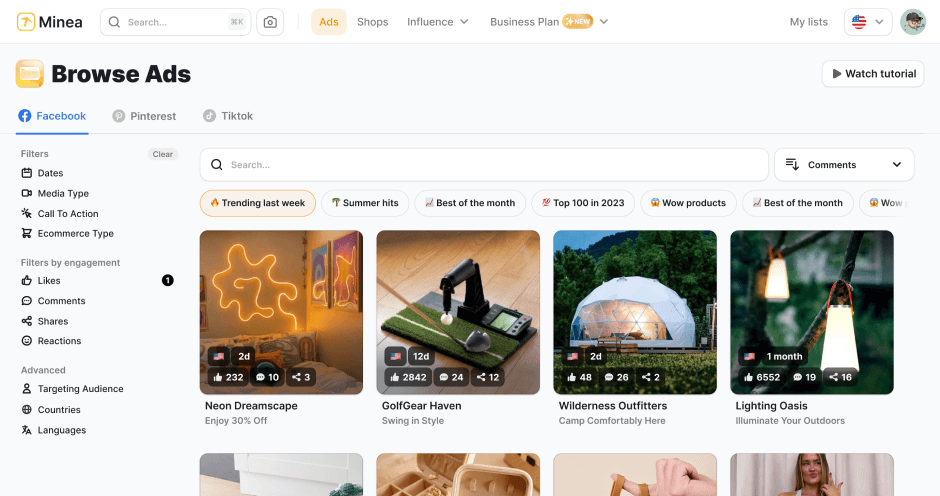
Find winning products on our Tiktok adspy today!
Find winning products on our Pinterest adspy today!
Find winning products on our Facebook adspy today!
Find winning products on our Tiktok adspy today!
Find winning products on our Pinterest adspy today!
Find winning products on our Facebook adspy today!
Find winning products on our Tiktok adspy today!
Find winning products on our Pinterest adspy today!
Find winning products on our Facebook adspy today!
Find winning products on our Tiktok adspy today!
Find winning products on our Pinterest adspy today!
Find winning products on our Facebook adspy today!
1 winning product everyday.
Follow us!



Our Free Adspys
Find winning products on our Tiktok adspy today!
Find winning products on our Pinterest adspy today!
Find winning products on our Facebook adspy today!
Find winning products on our Tiktok adspy today!
Find winning products on our Pinterest adspy today!
Find winning products on our Facebook adspy today!
Find winning products on our Tiktok adspy today!
Find winning products on our Pinterest adspy today!
Find winning products on our Facebook adspy today!
Find winning products on our Tiktok adspy today!
Find winning products on our Pinterest adspy today!
Find winning products on our Facebook adspy today!
1 winning product everyday.
Follow us!
Our Free Adspys
Find winning products on our Tiktok adspy today!
Find winning products on our Pinterest adspy today!
Find winning products on our Facebook adspy today!
Find winning products on our Tiktok adspy today!
Find winning products on our Pinterest adspy today!
Find winning products on our Facebook adspy today!
Find winning products on our Tiktok adspy today!
Find winning products on our Pinterest adspy today!
Find winning products on our Facebook adspy today!
Find winning products on our Tiktok adspy today!
Find winning products on our Pinterest adspy today!
Find winning products on our Facebook adspy today!
1 winning product everyday.
Follow us!




Find out more
Read more
Minea © 2025
Find out more
Read more
Minea © 2025
Find out more
Read more
Minea © 2025
Find out more
Read more
Minea © 2025
Find out more
Read more
Minea © 2025
Find out more
Read more
Minea © 2025
Find out more
Read more
Minea © 2025